

Remove advanced synchronization
Introduction
Section titled “Introduction”If for some reason you wish to remove or unregister the advanced synchronization from a management Server, it can easily be done in a few steps explained below.
| Step | Action |
| 1 | Right-click on the Management Server, and choose the menu item Remove synchronization service to start the Remove synchronization service wizard. 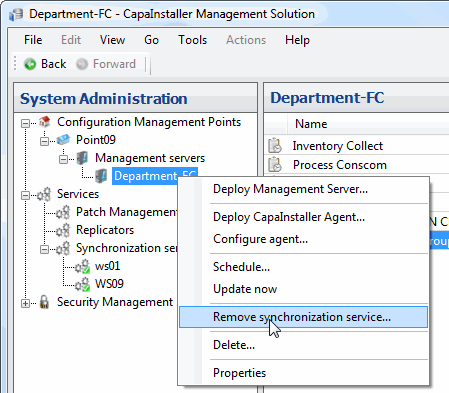 |
| 2 | You are then presented by this wizard that will give you two choices. The first choice ‘Remove all’ removes the files and folders on the server as well as any registration of the service in the SQL database. Click the button and proceed to step 3. The Second choice ‘Unregister only’ removes the service in the SQL database. No file or folder manipulation will take place. This is useful if the server is somehow removed from the network, and you are left with a server only existing logically in the SQL database. Click the button and proceed to step 3. 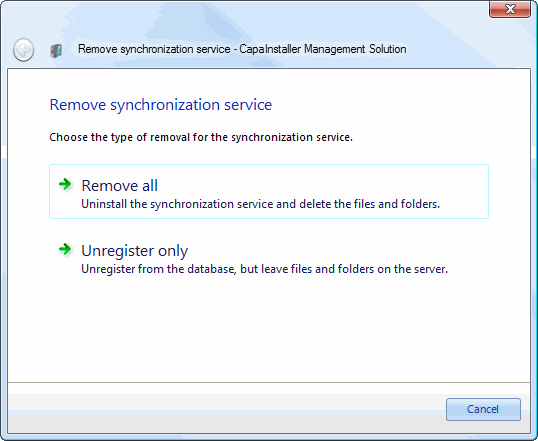 |
| 3 | You are then shown the status form shown below. The service has been removed from the SQL database, and you’ve finished. Click the ‘I am done’ button to complete the operation. 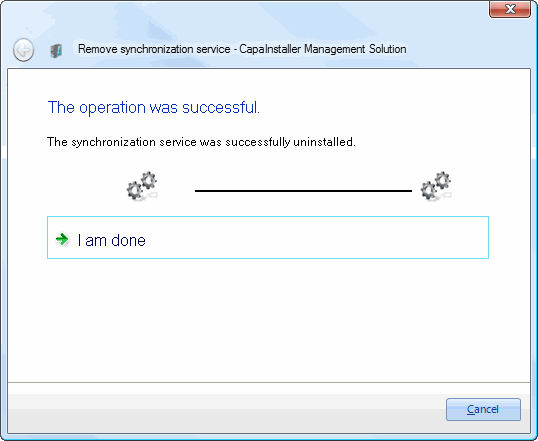 |