

CapaInstaller Network Port Reference
Use this page to plan firewall rules between CapaInstaller servers, managed devices, and the internet.
Find the ports your services use
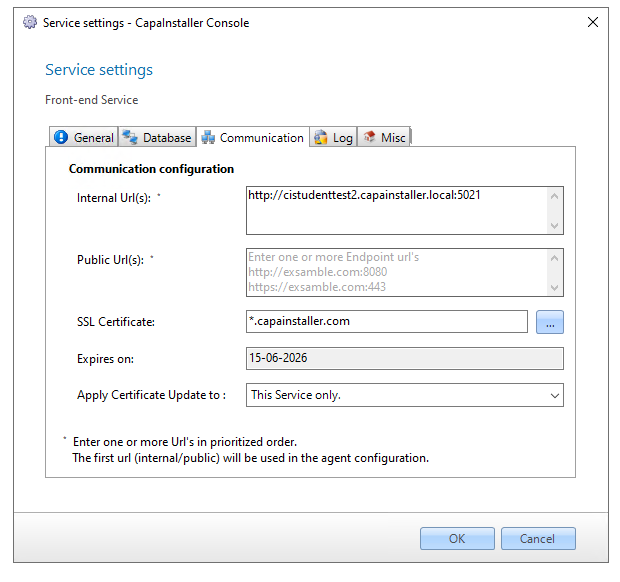
Section titled “Find the ports your services use”The ports in use are part of each service’s URLs. In System Administration, right-click a Front-end, Back-end, or OS Deployment service, select Service Settings, and open the Communication tab. The URL fields, such as Internal Url(s), show each URL the service listens on, including the port.
CapaInstaller services
Section titled “CapaInstaller services”| Service | Default port | Protocol | Notes |
|---|---|---|---|
| Front-end service, internal URL | 5021 (HTTP) or 443 (HTTPS) | TCP | Main address that agents use inside the organization. |
| Front-end service, public URL | 5022 (HTTP) or 443 (HTTPS) | TCP | Fallback address for agents outside the firewall. See Ports and encryption. |
| Back-end service | 5023 (HTTP) or 443 (HTTPS) | TCP | See Back-end Service. |
| OS Deployment service | 5030 (HTTP) or 443 (HTTPS) | TCP | See OS Deployment Service. |
| Data Connection Service | 5026 | TCP | See Data Connection Service. |
| Mobile Device Management service | 443 (HTTPS) | TCP | See MDM Network Ports for the full list of device management ports. |
| Self Service Portal | 9443 (HTTPS) | TCP | See Working with Self Service Portal. |
To switch a service from HTTP to HTTPS, see Use HTTPS in Backend, Frontend & OS Deployment Service.
OS deployment and PXE boot
Section titled “OS deployment and PXE boot”| Function | Port | Protocol | Notes |
|---|---|---|---|
| TFTP | 69 | UDP | Devices download the boot files during PXE boot. |
| DHCP (server) | 67 | UDP | Used by the DHCP proxy service. |
| DHCP (client) | 68 | UDP | Used by the DHCP proxy service. |
| Alternative DHCP listener | 4011 | UDP | Used when the DHCP proxy runs on the same server as the DHCP service. |
For more information, see DHCPproxy service.
Wake On LAN
Section titled “Wake On LAN”| Function | Default port | Protocol | Notes |
|---|---|---|---|
| Wake On LAN requests | 40000 | UDP | You can change the port in System Administration options. |
SQL Server
Section titled “SQL Server”The CapaInstaller Console, the Setup Wizard, and the CapaInstaller services connect to the CapaInstaller database on SQL Server. Open the port that your SQL Server instance listens on, which is TCP 1433 for a default instance. If the instance uses another port, the Back-end service also needs the SQL Server Browser service, which uses UDP 1434.
CapaInstaller Console
Section titled “CapaInstaller Console”The CapaInstaller Console uses RPC, WMI, and SMB to deploy services and run administrative tasks on servers and devices. See CapaInstaller Console Network Communication.