

Deploy to Reporting Services
Deploy a report to SQL Server Reporting Services, so users can run it from the Report Manager website.
-
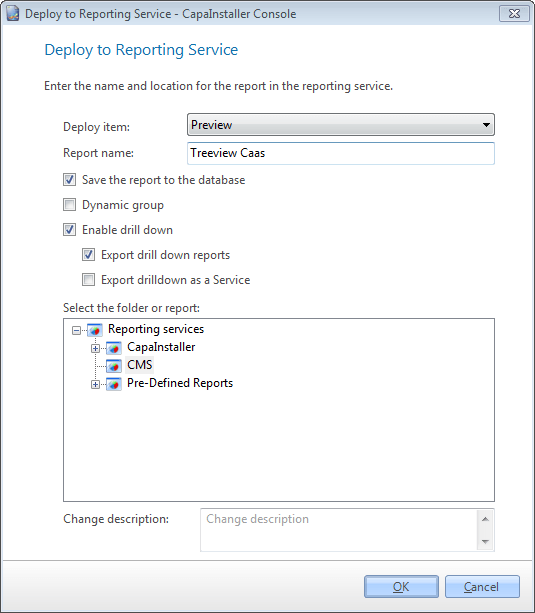
Select File → Deploy to reporting services…. You can also right-click an item in the tree view and select Deploy to Reporting Services….
-
In Deploy item, select what to deploy:
- Preview - The report you have created, with the selected items and criteria.
- Tree view selected node - The content shown in the content view for the selected tree view node.
- Software Vendor Report - The software vendor report you have specified. For more information, go to Create Software vendor report.
-
In Report name, enter the name of the report in Reporting Services.
-
If you selected Preview, choose whether to also save the report in the CapaInstaller database with Save the report to the database, and whether to save it as a dynamic group with Dynamic group.
-
Choose the drill-down options. For more information, go to Enable reporting services drill down.
-
In Select the folder or report, select the Reporting Services folder for the report. To create a folder, right-click the parent folder and select New folder…. If you select an existing report, its name is filled in, and the report is deployed to the same folder.
-
Optionally, enter a Change description.
-
Select OK. If a report with the same name already exists in the folder, you’re asked whether to overwrite it.
The report is deployed to the selected folder in Reporting Services.
Related tasks
Section titled “Related tasks”| If you want to… | You can… |
|---|---|
| Create a custom made report | Create a report to see how. |
| Manage report services | Manage reporting services to see how. |
| Deploy predefined reports to reporting services | Deploy predefined reports to reporting services to see how. |