

Enable Deployment Template
Assign a CapaOne token
Section titled “Assign a CapaOne token”Before you enable deployment template support, you must acquire a CapaOne token and assign it in the CapaInstaller Console.
See how to acquire and assign a token in CapaOne Integration in Console.
Enable deployment templates in the OS Point configuration
Section titled “Enable deployment templates in the OS Point configuration”-
In the OS Deployment tree, right-click the OS Point and select Configuration.
-
Select the OSD Gui tab and expand OSD Client.
-
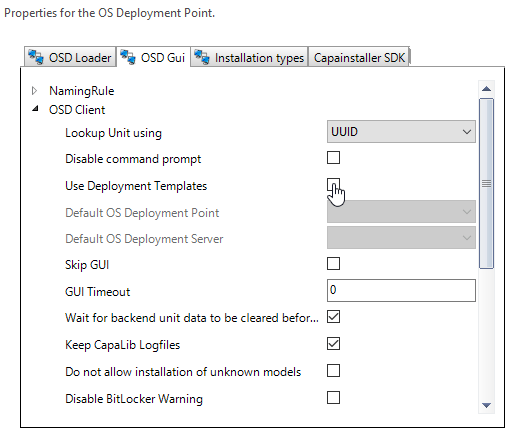
Select the Use Deployment Templates check box.
-
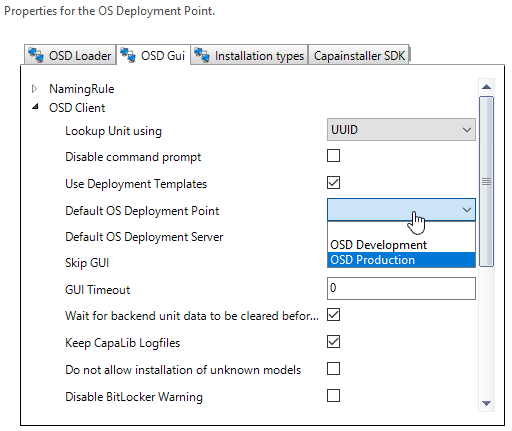
In Default OS Deployment Point, select the OS Point to use when you reinstall a computer that has no OS Deployment server registered, for example a computer that wasn’t installed with OS Deployment.
-
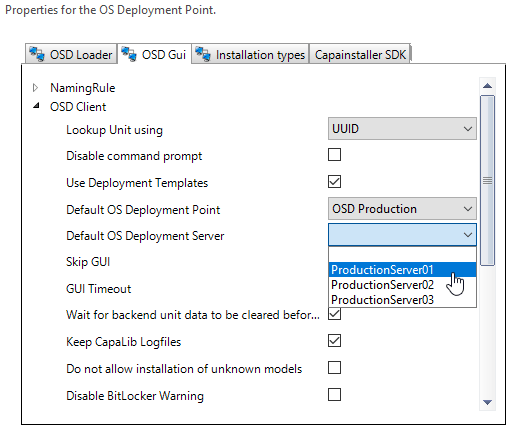
In Default OS Deployment Server, select the OS Deployment server to use for these reinstallations. The list shows the servers of the selected default OS Point.
-
Select OK.
When deployment templates are enabled, the Sync with CapaOne… and Open CapaOne… menu items appear on the OS Point context menu, and the Deployment Template selections appear on installation types, Business Units and OS Points.