

Create a query
Introduction
Section titled “Introduction”To ensure the correct software is present in the correct application groups you can use group queries. When the query is executed, software that matches the query and isn’t already linked to an application group is linked to the group. The CapaInstaller server runs the group queries regularly. To run them right away, use Process Software Group.
Both the name and the version are required. Each can contain one wildcard *, and it must be the last character.
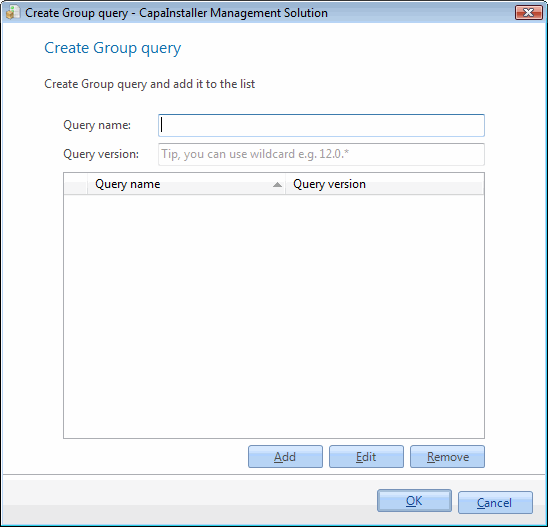
| Element | Description |
| Software name | Name of the Software query e.g. “Microsoft Word*” or “CapaInstaller”. |
| Software version | The version of the Software query e.g. “12.0.*” or “4.1”. Enter “*” to match all versions. |
| Add | Adds the entered query to the query list. |
| Edit | Loads the selected query into the fields so you can change it. |
| Remove | Removes the selected queries from the list. |
| Step | Action |
| 1 | In the Software view, right-click on the application group you want to add a query to. |
| 2 | Click Group query… |
| 3 | Type the software name the query should search for. |
| 4 | Type in the version of which the query should search for. |
| 5 | Click Add, and then click OK. |