

Deploy Predefined Reports to Reporting Services
CapaInstaller ships with a set of predefined reports. They’re available in Reporting Services only after you deploy them. For a list of the reports, go to Predefined reports.
-
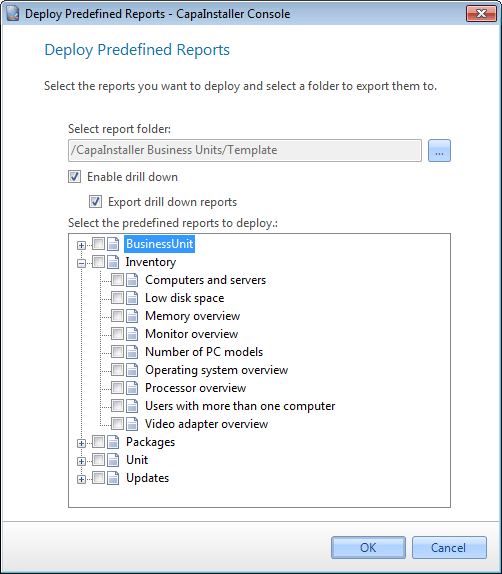
Select File → Deploy predefined reports to reporting services….
-
To select the Reporting Services folder for the reports, select the … button next to Select report folder, and then select a folder.

-
Choose the drill-down options. For more information, go to Enable reporting services drill down.
-
Select the reports you want to deploy. Select a group to select all the reports in it.
-
Select OK.
The reports are available in the selected folder in Reporting Services. The console remembers the folder for the next deployment.
Related tasks
Section titled “Related tasks”| If you want to… | You can… |
|---|---|
| Create a custom made report | Create a report to see how. |
| Manage report services | Manage reporting services to see how. |
| Deploy to reporting services | Deploy to reporting services to see how. |
| Create linked reports to Business units | Create linked reports to Business units to see how. |