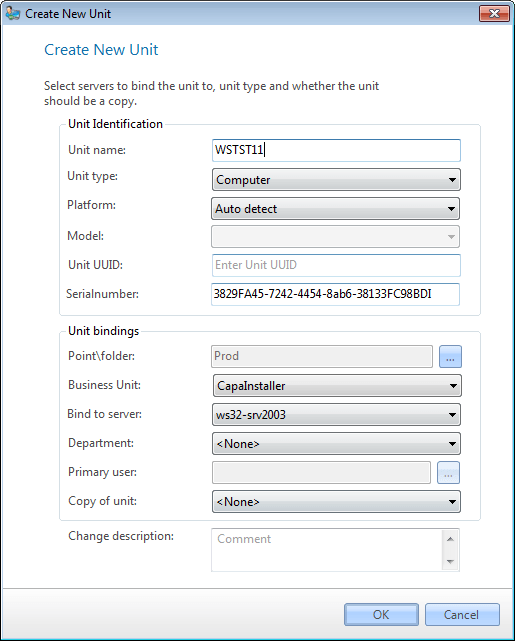
Units can be created from the File Menu in Unit view or by right-clicking on the different unit folders. The Create New Unit dialog is also used to create smartphones, tablets, and other devices; see Create a new smartphone or tablet.
|
|
| Element |
Description |
| Unit name |
Name of the computer. Required. The name must be unique for the unit type and can be up to 150 characters. |
| Unit type |
Select Unit type Computer. The other choices are Smartphone, Tablet, and Other devices. |
| Platform |
Select the platform for the computer. Select Auto-detect, for the platform to be defined from collected inventory |
| Model |
The model cannot be defined for a computer |
| Unit UUID |
The unique identifier for the computer |
| Serial number |
The serial number of the computer. This is the same serial number, as collected from the hardware inventory |
|
|
| Element |
Description |
| Point/folder |
Management Point or folder to place the new computer in. Required. |
| Business unit |
Link the computer to the selected Business unit |
| Bind to server |
Name of the container the computer will be connected to and where it will deliver its Inventory to and get it packages from. Required. |
| Department |
Link the computer to the selected department |
| Primary user |
The primary user is not available when creating a computer |
| Copy of unit |
You can make the new computer a copy of another unit, then it will be linked to the same groups and packages. |
| Change description |
Description of the changes to the Changelog. |
|
|
| Step |
Action |
| 1 |
Open Asset Management in Unit view, click File/New…, or right-click the Computers and Devices folder or a business unit below it and click New unit…. |
| 2 |
Type the computer name you want, this must be unique and aligned with your company standards. |
| 3 |
Select Computer in the Unit type. |
| 4 |
Select the Platform for the device. For a computer, the platform can be Windows, OSX or Auto-detect |
| 5 |
Enter the unique identifier for the device. |
| 6 |
Type the serial number of the device. If you do not know the serial number, leave the input empty and it will be collected from inventory. |
| 7 |
Choose the Point/folder. |
| 8 |
Select a Business Unit for the device |
| 9 |
Choose from the list which server you want to bind the unit to. |
| 10 |
Select a department for the device |
| 11 |
If you want to use another unit to copy from, select it in the Copy of unit list. |
| 12 |
Enter comments and click OK. The unit is now available in the tree view list. |
|
|
| If you want to… |
You can… |
| Set further attributes on a computer |
Work with assets to see how. |
| Relate the computer to a user |
Work with relations to see how. |
| Make a computer inactive |
Right-click on the computer and click Set inactive. |

