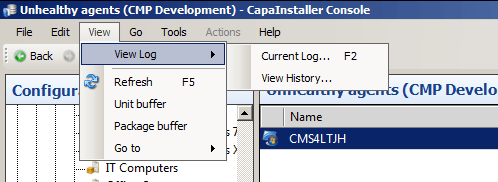
Console Log File
The CapaInstaller Console writes information and warning messages to a log file. The console normally doesn’t have permission to write to the Program Files folder, so the log is stored in your user profile.
Log file location
Section titled “Log file location”| Log | Location |
|---|---|
| Current session | %APPDATA%\CapaInstaller\Logs\CMS\Console <major version>.log, for example Console 6.log for CapaInstaller 6 |
| Previous sessions | %APPDATA%\CapaInstaller\Logs\CMS\History |
- When the console starts, it moves the log from the previous session to the
Historyfolder. - Log files in the
Historyfolder that are older than 30 days are deleted automatically when the console starts. - If the log file is locked, for example because another console session uses it, the console writes to a file with a number added, such as
Console 6(1).log.
Open the log from the console
Section titled “Open the log from the console”- To open the current log, select View → View Log → Current Log…, or press F2. The log opens in the program that is associated with the
.logfile extension. - To open the folder with logs from previous sessions, select View → View Log → View History….