

Use attachments
Introduction
Section titled “Introduction”Attachments are available on the Attachment tab in the content view, next to the Properties tab. You can add attached files of any type (such as PDF or text files containing technical documentation, maintenance agreements, repair records, etc.) to any unit or application. You can either create a new attachment or update an existing attachment.
The attachment is stored in the CapaInstaller database. Keep these limits in mind:
- A file larger than 5 MB can be attached, but you’re asked to confirm.
- A file larger than 20 MB can’t be attached.
- A unit or software can’t have two attachments with the same file name.
| Step | Action |
| 1 | Select the unit or software, and click on the Attachment tab. |
| 2 | Right-click the content view, and click New and the following form will show 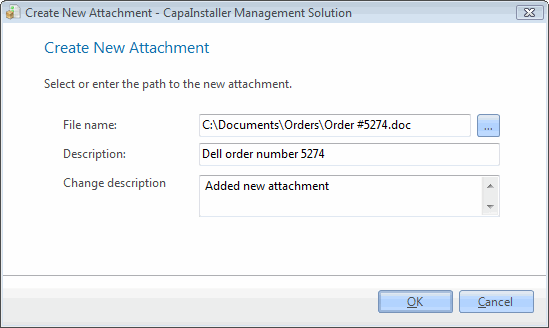 |
| 3 | Browse to find the file. |
| 4 | Enter a description and click OK. |
| 5 | The file is now attached. |
Related tasks
Section titled “Related tasks”| If you want to… | You can… |
| Edit an attachment | Edit attachment to see how. |
| Save an edited attachment | Click on File/Save attachment… and click OK. |
| Delete an attachment | Right-click the attachment and click Delete. |