

Deploying an MDM Service
This page describes the requirements and the steps for deploying the Mobile Device Management (MDM) Service.
Deploy the service
Section titled “Deploy the service”- In System Administration, expand Services, right-click the MDM Service folder, and select Deploy Mobile Device Managment Service….
- On the prerequisite page, make sure that the Front-end Service and the Back-end Service are passed. Click the status link to deploy a missing service.
- Enter the target server and click Validate. To deploy offline, select Enable offline installation.
- Configure the service. See MDM Service configuration options.
- Enter the user and operator agreements.
- Select how the service files are copied to the target server, and complete the wizard. If you selected offline installation, complete the installation on the target server as described in Offline deployment of services.
The service appears under Services in System Administration.
MDM Service configuration options
Section titled “MDM Service configuration options”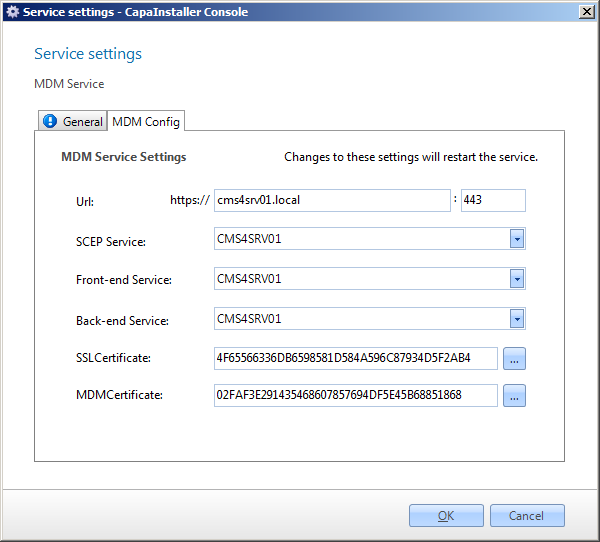
| Service configuration | Description |
|---|---|
| Public URL | The URL that devices use to connect to the service. |
| Public port | The port the service listens on. |
| Organization Name | The organization name shown on managed devices. |
| SSL Certificate | The certificate that secures the communication with the devices. |
| SCEP Service | The SCEP endpoint that the service uses to enroll devices. You can’t change this value. |
| Front-end Service | The Front-end Service that the MDM Service uses. |
| Back-end Service | The Back-end Service that the MDM Service gets its configuration and data from. |
| Platform support | Select the device platforms to manage: Apple iOS, Apple MacOS, Android, Windows Desktop, Windows Phone, and ChromeOS. |
| Windows Phone TLS port | The TLS port used for Windows devices. |
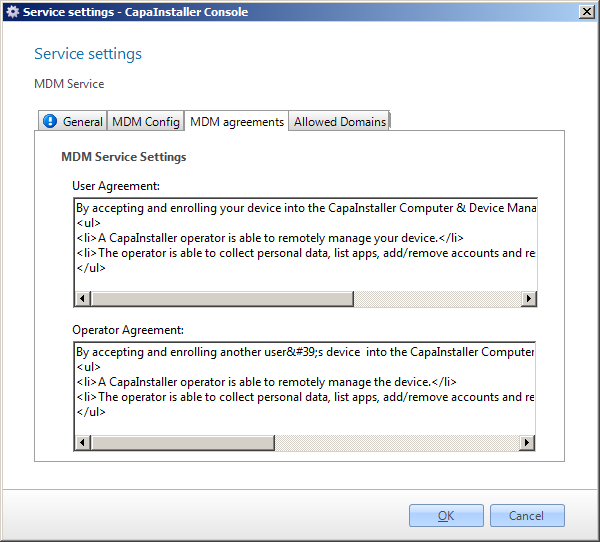
| User Agreement | The text shown to a user who enrolls a device. |
| Operator Agreement | The text shown to an operator who enrolls a device. |
You can change these settings later in the service settings. See Mobile Device Management Service.
Configure or update a certificate
Section titled “Configure or update a certificate”When a signed certificate is imported into the Windows Personal certificate store, you can add it to a CapaInstaller service.
Example: Adding a certificate to the MDM Service
- In System Administration, right-click the service and select Service settings….
- On the Configuration tab, find the certificate you want to add or update.
- Click the browse button to browse the local personal certificate store, and select the certificate.