

Package Creator
CapaInstaller Package Creator automates the creation of software packages in CapaInstaller and is designed to make packaging easier. All available package design rules are defined from the GUI. This ensures that all packages created have the same design resulting in a streamlined solution.
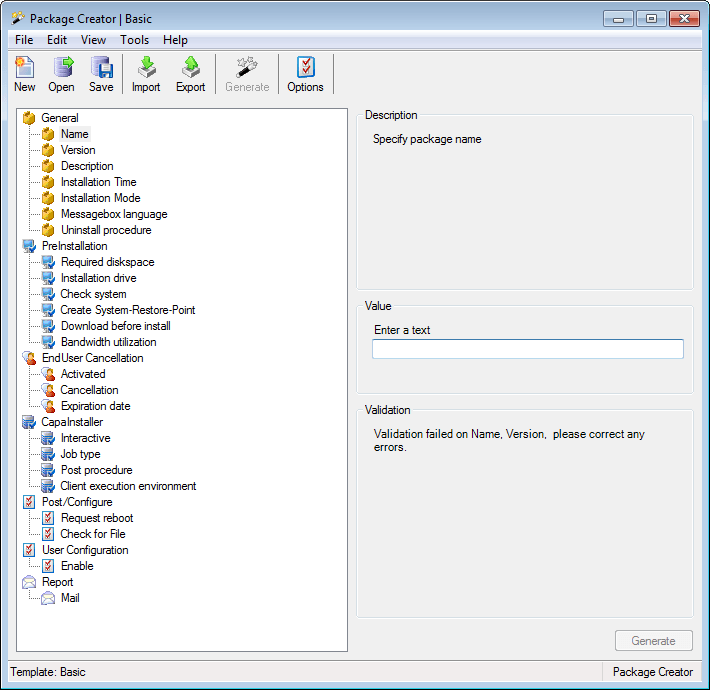
| Feature | Description |
| Precheck | Before the actual install is started a precheck can be made. The precheck is defined from the GUI and could contain a system health check, disk check etc. |
| Postcheck | When the installation has completed a postcheck can be made to determine if the installation was successful. |
| Dynamic reboot | When the installation has completed it is possible to reboot the client if needed. |
| Calendar function | It is possible to define a client calendar making it safer to deploy packages to a production environment. |
| End-user cancellation | Before the installation starts the end-user can cancel the installation and postpone it to a more appropriate time. This feature has been implemented so that a logged on user working with unsaved data can cancel the installation. |
| Message boxes | Message boxes can be localized. |
| Integration to helpdesk | If the installation fails it is possible to send an SMTP mail which can be forwarded to a helpdesk solution. |
| XML files load | You can import a package definition from an XML file on the command line: "<Package Creator folder>\Cipc.exe" /import "<productname>.xml" /keepgui /import imports the XML file into the Package Creator database and loads it. /keepgui keeps Package Creator open with the imported package. Without /keepgui, Package Creator closes when the import is done. See Commandline arguments. |
In this section
Section titled “In this section”- Installation - System requirements for running Package Creator.
- User guide - The GUI, core concepts, and step-by-step how-to guides.