

Unmanaged software queries
Introduction
Section titled “Introduction”Unmanaged Software queries are used to automatically move software from “All Software” to the “Unmanaged Software” group. Software in the Unmanaged Software group is hidden from reporting. Only software that isn’t linked to an application group is shown in these folders.
Open the dialog from Tools → Unmanaged Software Queries…, or right-click a software and click Add to unmanaged software queries to start with its name and version filled in.
Unmanaged Software queries can be exported and imported from Asset Management.
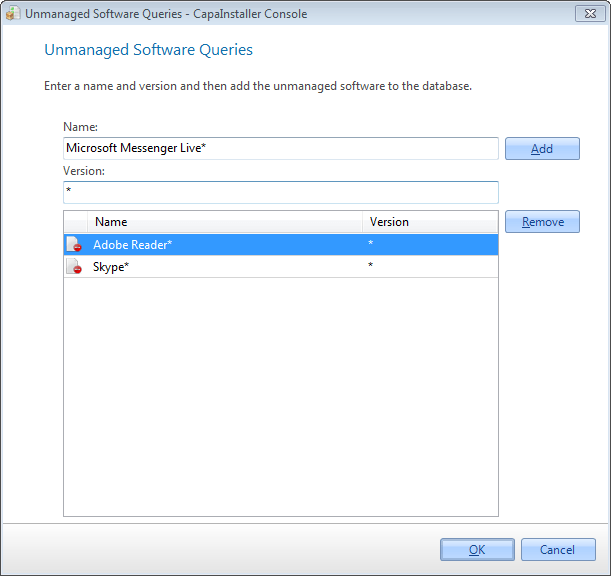
| Element | Description |
| Name | Name of the Software. Use * as a wildcard, e.g. Adobe Reader*. The name is required and can’t be only *. |
| Version | The version of the Software. Use * as a wildcard. Enter * to match all versions. |
| Add | Adds the entered name and version to the Unmanaged Software Queries list. |
| Remove | Removes the selected queries from the list. |