

Reporting and Queries options
The following is a description of the options for Reporting and Queries. To open them, select Tools → Options…, and then select Reporting and Queries.
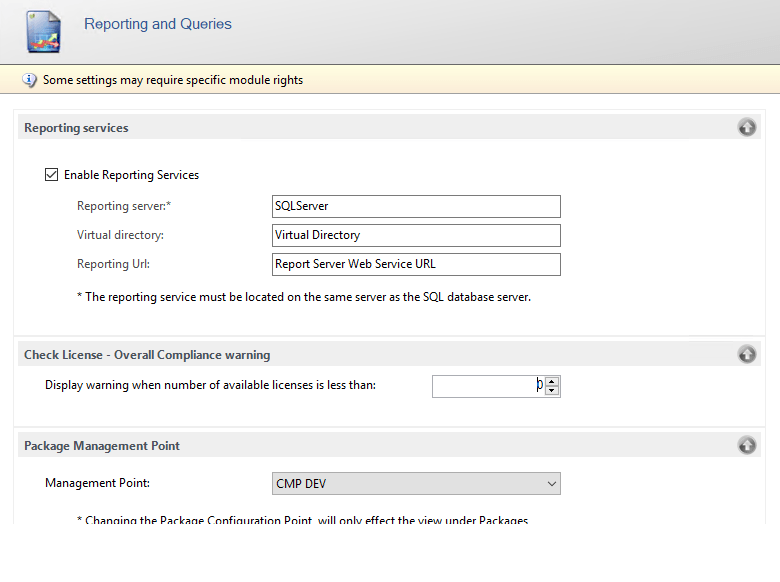
Reporting services
Section titled “Reporting services”| Element | Description |
|---|---|
| Enable Reporting Services | Choose to enable or disable Reporting Services. If you enable Reporting Services, enter a server and a virtual directory. |
| Reporting server | Enter the server name of the Reporting Services server. The reporting service must be located on the same server as the SQL database server. |
| Virtual directory | The virtual directory on the Reporting Services server. The virtual directory is entered when you install Reporting Services. If it isn’t set, the console suggests ReportServer, or ReportServer_<instance> for a named SQL Server instance. |
| Reporting Url | The Report Server Web Service URL. You can find it in Reporting Services Configuration Manager on the SQL Server. |
Check License - Overall Compliance warning
Section titled “Check License - Overall Compliance warning”| Element | Description |
|---|---|
| Display warning when number of available licenses is less than | A warning is shown when the number of available software licenses is lower than this number. |
Package Management Point
Section titled “Package Management Point”| Element | Description |
|---|---|
| Management Point | Select the Management Point whose packages are shown in the package view. Changing the Management Point only affects the view under Packages. |