

All updates
The All updates folder contains all the updates delivered from the WSUS server. From here, the patch manager in your organization reviews the updates and approves the ones that benefit your environment.
Updates move through a flow: from All updates to the first group under a child point, for example Test, and once tested, on to the next group, for example Production.
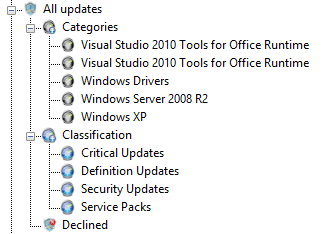
The folder has these subfolders:
| Folder | Description | Actions |
|---|---|---|
| Classification | One subfolder for each classification. | Right-click updates to select Approve, Not approved, or Decline. |
| Categories | One subfolder for each category. | Right-click updates to select Approve, Not approved, or Decline. |
| Declined | The updates that have been declined. | Right-click updates to select Approve. |
When you approve an update from All updates, you select the groups to approve it to. To decline an update, you must use All updates.
Related tasks
Section titled “Related tasks”| If you want to… | You can… |
|---|---|
| Automatically approve updates | Approval rules |
| Approve updates from All updates | Approve from All updates |
| Approve updates | Approve updates |
| Decline updates | Decline Updates |