

Database connection
Use the Database connection dialog to specify which CapaInstaller database the console connects to. To open it, select Tools → Database options….
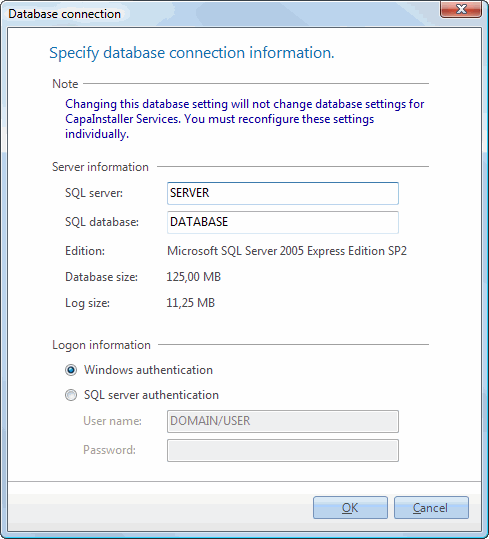
| Element | Description |
|---|---|
| SQL server | The SQL Server that hosts the CapaInstaller database. If you use a named instance, enter it as SERVER\INSTANCE. |
| SQL database | The name of your CapaInstaller database. |
| Edition | The SQL Server edition of the server you’re connected to. |
| Database size | The size of the database you’re connected to. |
| Log size | The size of the database’s log file. |
| Windows authentication | The console connects to the database with your own Windows account. |
| SQL server authentication | The console connects to the database with a SQL Server login. Enter the User name and Password. |
When you click OK, the console connects to the database and checks that the database version is compliant with the console and that the database has a valid license. If the connection works, the console tells you that it must restart, and then restarts with the new database connection.
If the console can’t connect, you get the message Unable to connect to the database. Check the server name, the instance name, and the database name.