

Setup metering history
Introduction
Section titled “Introduction”Metering history is used to make an overview of, how much each program is being used over time. Together with the number of licenses, it is possible to see if the company is having enough licenses. Metering history is enabled per application group, and the group must have at least one metering executable first.
Add a metering executable
Section titled “Add a metering executable”Right-click the application group in the Software view and click Metering Executable.
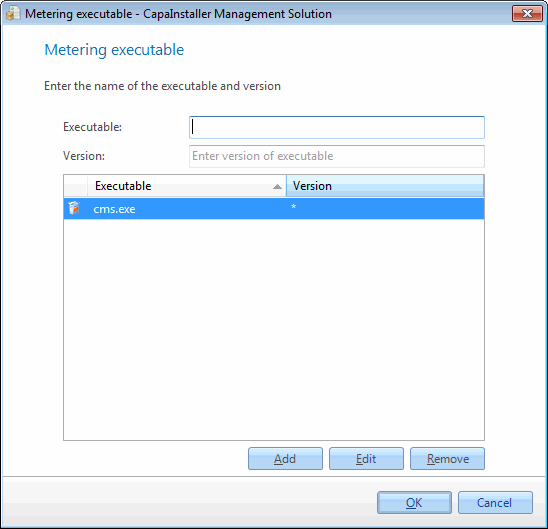
| Step | Action |
| 1 | Enter a metering executable. The name must end with .exe, e.g. winword.exe. |
| 2 | Enter a metering executable version, it can be only the wildcard * or it can end with the wildcard * |
| 3 | Click Add to add the metering executable |
| 4 | Click OK to save the changes |
Enable metering history
Section titled “Enable metering history”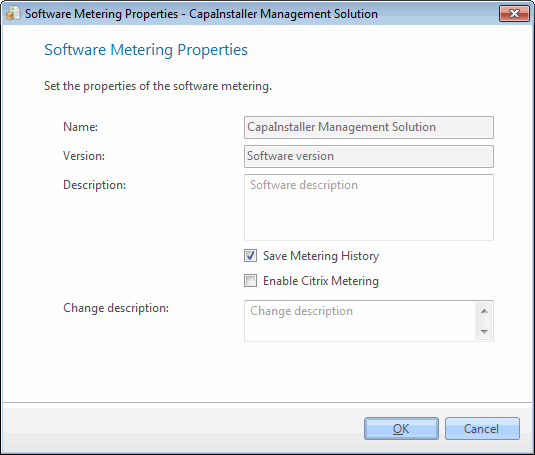
| Step | Action |
| 1 | Right-click the Application group and click Properties. The above window opens. |
| 2 | Check Enable metering history to enable Metering history to be collected |
| 3 | Enter a change description and click OK to save the changes |
You can also right-click the application group and click Enable Metering History. To stop collecting, right-click the group and click Disable Metering History.
How the history is updated and kept
Section titled “How the history is updated and kept”The CapaInstaller server processes the metering history once every 24 hours. To update the history for a group right away, right-click the group and click Update Metering history. This can take several minutes.
The number of days the history is kept is set in Asset Management options:
| Setting | Default | Range |
|---|---|---|
| Number of days, to save metering history | 14 | 14 to 60 days |
| Number of days, to save metering history peak | 90 | 30 to 356 days |
If you lower the number of days, history older than the new value is deleted.