

Process Software Group
Introduction
Section titled “Introduction”Right-click the Application groups folder under Software will show this context menu. Clicking on one of these process items will process the selected area. The same Process menu is available when you right-click a single application group; then only that group is processed.
The CapaInstaller server also processes this data automatically: group queries on a regular schedule, and metering history once every 24 hours. Use Process when you want the result right away, e.g. after you have added a group query or a license. Processing can take several minutes, and you’re asked to confirm first.
| Step | Action |
| 1 | Click on the Software view. |
| 2 | Right-click on the Application groups folder, and click Process. The menu is only available when the folder contains application groups. 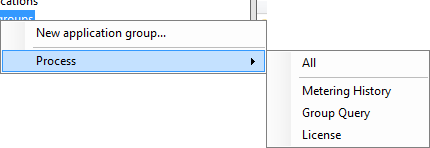 |
| 3 | Choose between All, Metering History, Group Query, or License. |
| Option | Action |
| All | Process all of the following process functions |
| Metering History | Process the data for Metering history view, license and license forecast |
| Group Query | Process the Application group queries, which moves software to the specific application group |
| License | Process the Application group license and license forecast |