

Patch management tree view
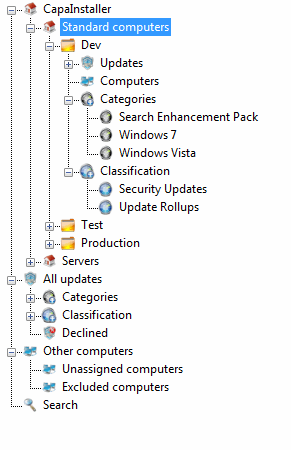
The following is a description of the Patch Management tree view in the main window.
The Patch Management tree
Section titled “The Patch Management tree”The tree is organized in three levels:
- Patch Management root point — the first element in the tree view. There can only be one root point.
- Patch Management child points (for example Standard computers) — below the root point there can be one or more child points, which contain the groups.
- Patch Management groups (for example Dev, Test, Production) — below the child points there can be one or more groups, which contain the updates and computers.
Under each group, these folders are displayed:
- Updates — the updates for the group, in the subfolders Approved for installation, Approved for removal, and Not approved.
- Computers — the computers linked to the group.
- Classification and Categories — the group’s updates sorted by classification and category.
Below the points, the tree also contains:
- All updates — every update synchronized from the WSUS server, sorted by classification and category, and a Declined folder.
- Other computers — the Unassigned computers and Excluded computers folders. See All computers.
- Search — the results of a search for updates or computers. To search, select Edit → Find… or press F3.
Missing points or groups
Section titled “Missing points or groups”If one or more of your Patch Management points or groups are deleted or missing on the WSUS server, the tree view shows them differently: the icon turns black and white, and you cannot perform all the actions on that point or group.
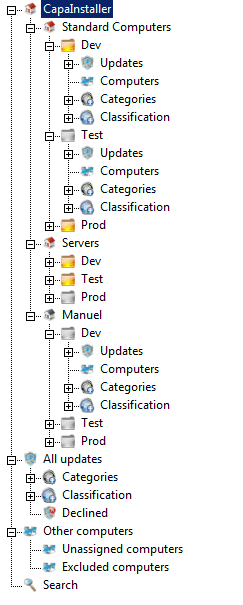
To re-create the missing points and groups, see Re-create Patch Management Point or Group.
Related tasks
Section titled “Related tasks”| If you want to… | You can… |
| Create root point | Create a Patch Management root point |
| Create child point | Create a Patch Management child point |
| Create group | Create a Patch Management Group |
| Re-create point or groups | Re-create Patch Management Point or Group |
| Approve updates | Approve updates |