

Work with metering
Introduction
Section titled “Introduction”Metering application usage with CapaInstaller gives you the opportunity to harvest inactive licenses. The metering module collects information about the last application start time, start count, last usage minutes, etc. The metering runs as part of the CapaInstaller Agent on the computers.
Metering for an application can be made on a number of files. To define multiple metering points add multiple metering executables to the application group.
E.g. for Microsoft Office 2007 it is possible to add the following applications:
Microsoft Office 2007 Excel (metering module excel.exe)
Microsoft Office 2007 Winword (metering module winword.exe)
Microsoft Office 2007 Powerpoint (metering module powerpnt.exe)
Etc.
If metering history is enabled historic information is collected and stored in the database
Note:
We recommend you have read the Metering description before setting up any of this.
Enable metering on a software package
Section titled “Enable metering on a software package”| Step | Action |
| 1 | Click on.  |
| 2 | Go to the Application groups folder, find the application group you want to run metering on. |
| 3 | Right-click on the application group and click Metering Executable. |
| 4 | Type in the metering executable and version, and click Add. The executable must end with .exe. 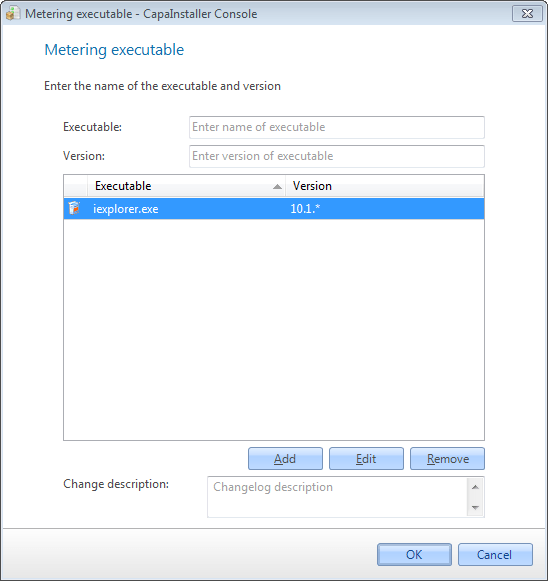 |
| 5 | Enter changelog description |
| 6 | Click OK to save the changes |
Enable metering history
Section titled “Enable metering history”| Step | Action |
| 1 | Click on. |
| 2 | Go to Application group folders, find the application group you want to run metering history on. |
| 3 | Right-click on the Application group and click Enable Metering History. The menu item is only shown when the application group has at least one metering executable. |
| 4 | Click Yes to confirm. |
Related tasks
Section titled “Related tasks”| If you want to… | You can… |
| Stop metering history | Right-click on the application group and click Disable Metering History. |
| Stop metering | Right-click on the application group, click Metering Executable, and remove the executables. |
| Update the metering history now | Right-click on the application group and click Update Metering history. See Setup metering history. |
| Create a new application group | Create an application group to see how. |
| Change metering executable | Right-click on the application group, click Metering Executable and add or remove the executable file for the software. |
| Save metering history | Right-click on the Application group, click Properties and check the Enable metering history checkbox. |
| Enable Citrix metering | Right-click on the Application group click Properties and check the Enable Citrix metering check box. |
| See properties for an Application group | Right-click on the Application group, click Properties for description Metering properties. |