

Reinstall a computer
From Configuration Management you can schedule a computer to be reinstalled using OS Deployment settings. These settings are required in order to set up a computer to be reinstalled.
A new name for the computer can be specified, and it can be scheduled to occur at a time where it isn’t being used after work hours. If it is more urgent it can be configured to reinstall the computer the next time the CapaInstaller Agent runs.
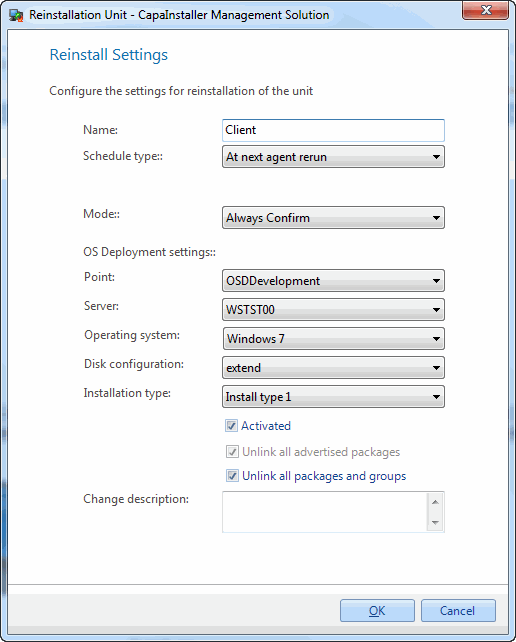
| Element | Description |
| Name | This will be the name of the computer after reinstalling it. |
| Schedule type | Choose At next agent rerun or Custom schedule. When you configure a custom schedule, you can include a Wake-on-LAN request. |
| Mode | Choose whether the user needs to confirm the reinstall: Always Confirm, Confirm Only If User Logged On, or Silent. |
| OS Deployment points | The OS Point being used. |
| OS Deployment servers | A server on the OS Point selected. |
| Images | An Operating System on the OS Point selected. |
| Disk configuration | A Disk Configuration on the OS Point selected. |
| Installation type | An Installation Type. This is not mandatory. |
| Business Unit | The business unit of the computer. This is shown for information. |
| CustomField1, CustomField2 | Shown only if custom fields are configured in OS Deployment. Enter the values to use for the reinstallation. |
| Activated | While this is unchecked the computer will not be reinstalled. |
| Unlink all advertised packages | Choose whether or not all installed advertised packages should be unlinked from the computer. |
| Unlink all packages and groups | Choose whether or not the computer should be unlinked from all groups and packages. Checking this will disable the option regarding advertised packages. |
| Change description | The custom comment that will be added to the changelog. |
| Step | Action |
| 1 | In Configuration Management, find the computer to reinstall, right-click it, and select Reinstall…. |
| 2 | Fill out the fields above. |
| 3 | Click OK. |
| 4 | If you selected Custom schedule, the settings are saved and the schedule window opens, so you can define when the reinstall should occur. You can change the schedule later with Edit Schedule in the same window. |