

Dynamic groups
Unit membership in a dynamic inventory group is based on various types of inventory information gathered about the various units. You can establish complex logical criteria for defining the membership of each group. To view the units that are currently part of a dynamic group, click on the group name in the left frame and look at the list in the right frame. Membership is maintained by the Replicator, so updates will appear only as often as the Replicator runs the Process SQL group job. You may therefore need to wait a short time before units appear in a new dynamic group.
Properties
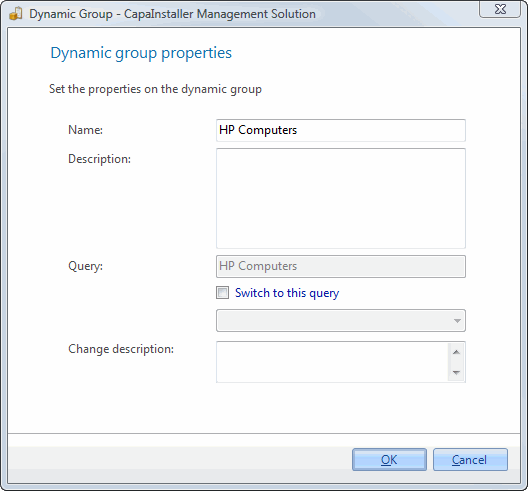
| Element | Description |
| Name | Name of the group. |
| Description | Description of the group. |
| Query | The name of the query the dynamic group is based on. |
| Change to this query | Checking this allows you to choose another query to base the dynamic group on. |
| Change description | A custom comment that will be added to the changelog. |
You can’t paste units into this type of group, because the Replicator maintains the membership.
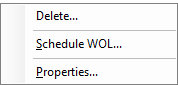
Right-clicking on a group gives you the following options:
| Element | Description |
| Paste packages | Only shown when the package buffer contains packages of the same type as the group (computer or user packages). Links the packages to the group. |
| Paste printers | Only shown when the unit buffer contains printers. Links the printers to the group. |
| Paste Profiles/Applications | Only shown when the profile buffer contains profiles or applications. Links them to the group. |
| Paste Self Service Configurations | Only shown when the buffer contains Self Service Configurations. Links them to the group. |
| Set default printer… | Only shown when printers are linked to the group. Sets the default printer for the members of the group. |
| Load/Refresh Packages | Only shown when you right-click the group in the tree view. Loads the packages that are linked to the group. |
| Delete a group | Delete… — Opens the delete group form. |
| Scheduling | Schedule WOL… — Opens the schedule form for the group. Schedules a Wake On LAN for the units in the group. Only shown for groups that contain computers. |
| Reset Schedule’s last run | Resets the last run time of the group’s Wake On LAN schedule. Only shown for groups that contain computers. |
| Properties… | Shows the properties for the group. |
Icons
| Element | Description |
 |
Dynamic Computer Group. |
 |
Dynamic Computer Group with a WOL scheduled. |
 |
Dynamic User Group. |