

Work with application group license
Introduction
Section titled “Introduction”With application group licenses you register the number of licenses bought for the applications in the group. The licenses can have an expiration date or run forever. The application licenses are also displayed in the metering history graph in the detail view and used with the license forecast.
To open the Application licenses dialog, right-click the application group in the Software view and click Licenses.
License types
Section titled “License types”Per Device: You must acquire a license for each device on or from which you access or use the software (locally or remotely over a network).
Secondary Usage: Allows employees who are primary users of a licensed PC to be more productive by sharing the same application license on the work PC as well as a portable PC for work-related purposes only.
Concurrent usage: License Type for software that can be accessed by a specific number of users at a time.
Per Processor: A Processor License includes access for an unlimited number of users to connect from either inside the local area network (LAN) or wide area network (WAN), or outside the firewall (via the Internet). You do not need to purchase additional server licenses, CALs, or Internet Connector Licenses.
Select None if you don’t want to specify a license type.
Add licenses
Section titled “Add licenses”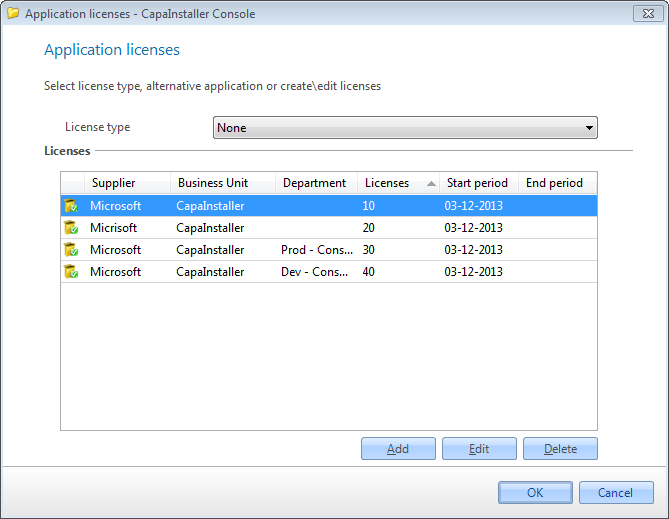
| Step | Action |
| 1 | Select the license type for the application group. |
| 2 | Add one or more licenses with Add. To change or remove a license, select it and click Edit or Delete. |
| 3 | Click OK to save the changes |
When you click Add or Edit, the Create new license dialog opens:
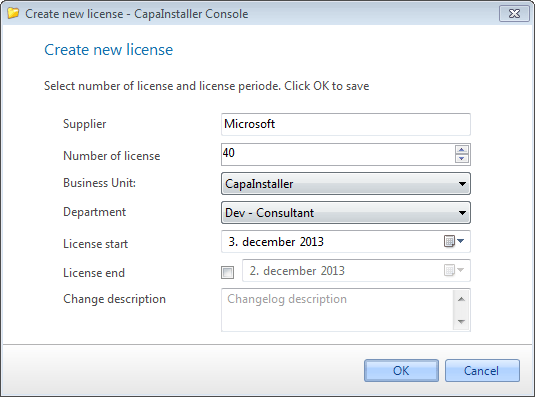
| Step | Action |
| 1 | Enter the name of the supplier. Required. |
| 2 | Enter the number of licenses. Required. |
| 3 | Select a Business unit, if the entered licenses are bought for a specific business unit |
| 4 | Select a department, if the entered licenses are bought for a specific department. The list shows the departments in the selected business unit. |
| 5 | Enter the purchase or start date for the licenses |
| 6 | Enter a license end date, if the licenses have an expiration date. The end date must be later than today. |
| 7 | Click OK to save the changes |