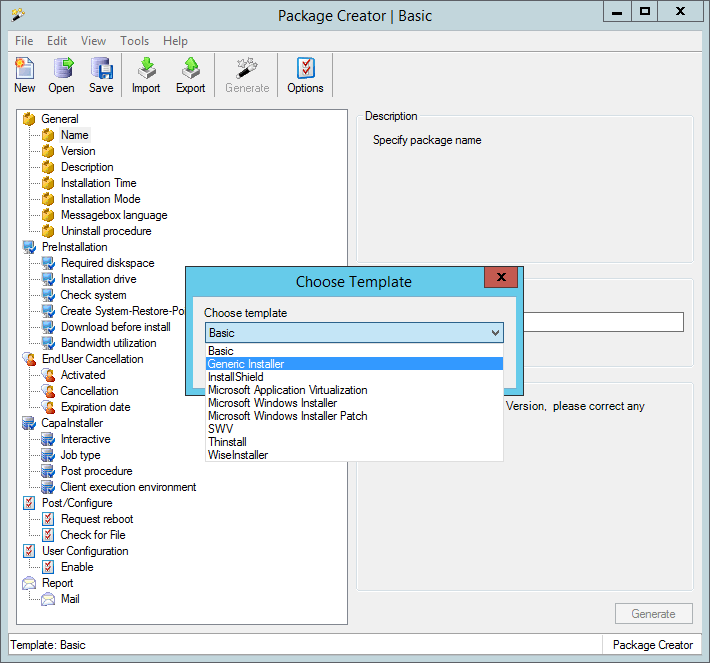
Templates
Various templates have been created making it possible to either create a package based on an application using Microsoft Windows Installer (MSI) or Install shield etc.
| Template | Description |
| Basic | The Basic template can be used to create an empty CapaInstaller script that is used for configuration, patching etc. An uninstall script is only created if you set Uninstall procedure to Yes in the General section. The default is No |
| Generic Installer | The Generic template can be used to create a CapaInstaller script which is used to launch a generic setup.exe/install.exe with a pre-defined set of parameters |
| InstallShield | The InstallShield template can be used to create a CapaInstaller script which is used to launch an InstallShield setup.exe with a pre-defined set of parameters |
| Microsoft Windows Installer | The Microsoft Windows Installer template can be used to create a CapaInstaller script which is used to launch an MSI file. Options, log, install behavior can be defined from the tree view |
| Microsoft Windows Installer Patch | The Microsoft Windows Installer Patch template can be used to create a CapaInstaller script which is used to launch an MSP file. Options, log, install behavior can be defined from the tree view. |
| Microsoft Application Virtualization | The Microsoft Application Virtualization template can be used to deploy applications virtualized using Microsoft Application Virtualization. |
| SWV | The Software Virtualization Solution (SVS) template, now named SWV, can be used to deploy the Virtual Software Archives. See Virtualization |
| Thinstall | The Thinstall template can be used to deploy Thinstalled applications |
| WiseInstaller | The WiseInstaller template can be used to create a CapaInstaller script where the application setup is created using WiseInstaller |
When you select File → New Package, you’re prompted for which template to use in the Choose Template dialog. The last selected template is pre-selected in the dialog, and is also loaded when you start Package Creator.
The template currently loaded will appear in the title bar and in the status bar.