

Assign Replicator
You can assign a Replicator to a specific task (Replicator job). The selected Replicator then carries out that task for the selected Management Server.
-
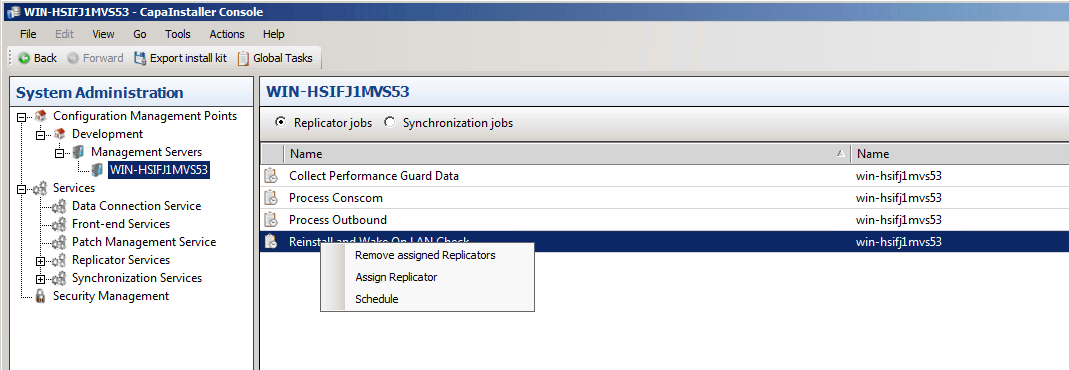
In System Administration, expand Configuration Management Points, expand the point and its Management Servers node, and select the Management Server whose tasks you want to change.
-
Right-click the job and select Assign Replicator….
-
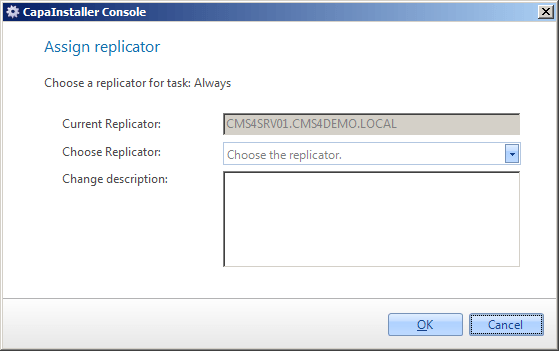
Fill in the dialog:
Element Description Current Replicator The Replicator currently assigned to the task. Choose Replicator The Replicator you want to assign to the task. Change description A comment that is added to the changelog. -
Click OK.
To remove the assignment, right-click the job and select Remove assigned Replicators.