

Troubleshoot Patch Management
The following describes the tools you can use to troubleshoot a Patch Management installation.
Patch Management Service
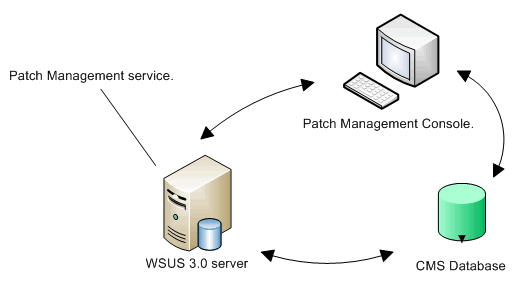
Section titled “Patch Management Service”When Patch Management is installed, a Windows service called CapaInstaller Patch Management Service (cipms) is installed on the server where WSUS is installed. The service synchronizes the WSUS server and the CapaInstaller database, and it performs all interaction with the WSUS server. The service performs these tasks:
- Synchronize computers — every 10 minutes, computers are assigned to groups by query based membership and automatic computer assignment.
- Synchronize updates — all updates on the WSUS server are registered and updated in the CapaInstaller database.
- Synchronize categories and classifications — all categories and classifications on the WSUS server are registered and updated in the CapaInstaller database.
- Approve updates — if approval rules are set up, updates are approved and updated in the CapaInstaller database.
Updates, categories, classifications, and approvals are synchronized every 12 hours. To start this synchronization sooner, click Sync updates in the Patch Management plug-in. For details, see Patch Management Service settings.
The status bar of the Patch Management plug-in shows whether the console is connected to the service and the WSUS server, and when the last computer and update synchronizations completed. If the plug-in reports that the Patch Management Service has not been installed, deploy it from System Administration. See Deploy Patch Management Service.
Log files
Section titled “Log files”The service writes log files on the server where it’s installed, in %ProgramFiles%\CapaInstaller\Logs\Services\PMService\. The log files describe all events and errors.
| Log file | Content |
|---|---|
Cipms.log |
The main log for the Patch Management Service, including each synchronization cycle. |
Remoting.log |
The connection to the WSUS server and the actions performed against it. |
SyncComputers.log |
Computer synchronization and assignment of computers to groups. |
SyncUpdates.log |
Update synchronization. |
SyncCategory.log |
Category and classification synchronization. |
AutoApproval.log |
Automatic approval of updates according to the approval rules. |
MoveService.log |
Re-creation of points and groups on the WSUS server after the service has been moved. |
SyncUpgrade.log |
Upgrade of an old WSUS group structure. |