

Use unmanaged software queries
Introduction
Section titled “Introduction”Unmanaged Software queries are used to hide certain software from All software and from reporting. A query consists of a Software name and a version. Both can contain the wildcard *, e.g. name Adobe Reader* and version *. The CapaInstaller server regularly runs through the queries and moves all matching software to the Unmanaged Software folder, where it’s hidden from reporting.
If the query is deleted, the software that matched it is shown in All software and in reporting again. Unmanaged Software queries can be exported and imported from Asset Management.
The added and removed queries are not saved to the database until clicking on the OK button.
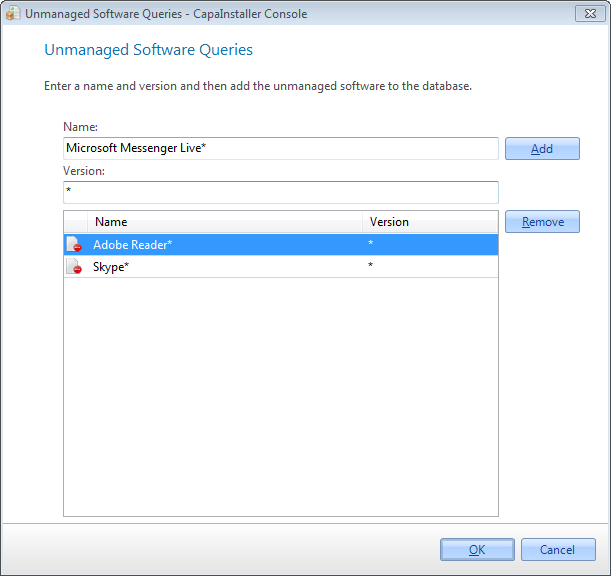
Add unmanaged software queries
Section titled “Add unmanaged software queries”| Step | Action |
| 1 | In the Software view, click Tools → Unmanaged Software Queries…. You can also right-click a software and click Add to unmanaged software queries. |
| 2 | Enter a name for the query. The name can’t be only *. |
| 3 | Enter a version for the query. Enter * to match all versions. |
| 4 | Click Add to add the Unmanaged Software Query to the list. |
| 5 | Click OK to add the queries to the database. |
Remove unmanaged software queries
Section titled “Remove unmanaged software queries”| Step | Action |
| 1 | Click Tools → Unmanaged Software Queries…. |
| 2 | Select the query to remove. |
| 3 | Click Remove to remove the selected query. |
| 4 | Click OK to remove the queries from the database. |
To move a single software without a query, right-click it and click Add to unmanaged software. To move it back, right-click it in Unmanaged Software and click Add to All Software.