

Offline deployment of services
Use offline deployment when the server that will host the service can’t be reached from The Operator Computer, for example because it’s in a DMZ. You register the service in the console, and then download and run the installer on the target server from the Back-end Service.
Register the service in the console
Section titled “Register the service in the console”-
Start the deployment wizard for the service. See Service Deployment.
-
Enter the target server and select Enable offline installation.
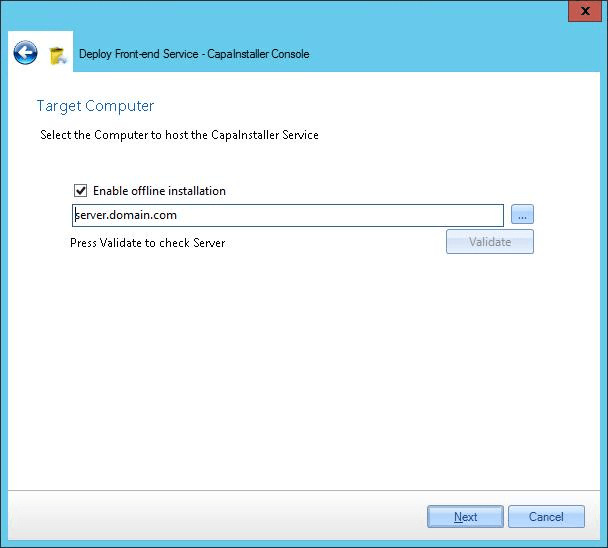
-
Complete the wizard.
Install the service on the target server
Section titled “Install the service on the target server”-
Sign in to the target server as an administrator.
-
Open a browser and make sure that it allows downloads.
-
Go to the
/installaddress of the Back-end Service, and add the DNS name of the target server:http://<ciBackendServer>:<port>/ciBackend/Install?fqdn=<fqdn>The page lists the services that are registered for the server.
-
If Microsoft .NET Framework 4.6.2 isn’t installed on the server, click the prerequisite link and install it.
-
Click the Install the … Service link for the service. The installer file downloads.
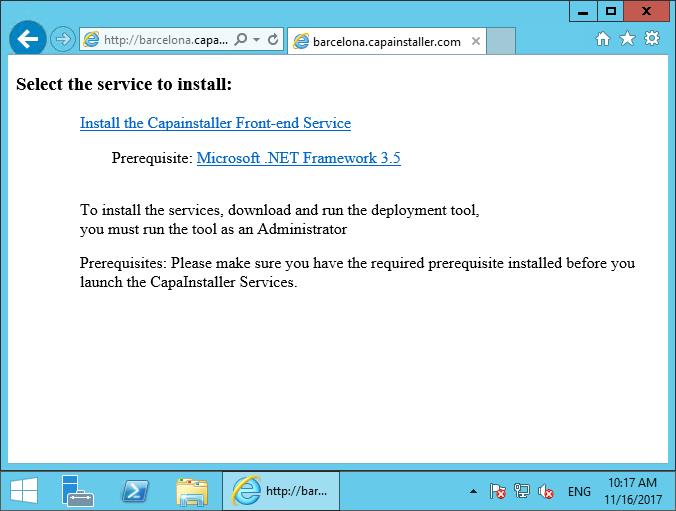
-
Run the downloaded installer as an administrator.