

Back-end Service
This page describes the requirements, locations, and settings of the CapaInstaller Back-end Service. The Back-end Service is an HTTP service with a REST interface. It’s the point of connection for other CapaInstaller services that need access to the CapaInstaller database or to Active Directory.
These services depend on a Back-end Service:
- The OS Deployment Service
- The Mobile Device Management (MDM) Service
The Back-end Service also hosts the installation page that you use for Offline deployment of services.
Requirements
Section titled “Requirements”- The Back-end Service is a Windows service that runs on x64 and x86 processors.
- The service requires Microsoft .NET Framework 4.6.2.
- The service requires the SQL Server Browser service to run if the SQL server doesn’t use the default port.
- A Management Point must exist before you can deploy the service.
Locations
Section titled “Locations”- The service is deployed from the System Administration plugin in the CapaInstaller Console. See Deploy the Back-end Service.
- The service is installed in
C:\Program Files\CapaInstaller\Services\CiBackEnd. - The service writes its log file
CiBackend.loginC:\Program Files\CapaInstaller\Logs\Services. - The default port is
5023for HTTP and443for HTTPS.
Command-line interface
Section titled “Command-line interface”The service gets its configuration from the SQL server, but it accepts command-line arguments. Because the Back-end Service is a Windows service, supply the arguments with net.exe or sc.exe.
Parameter syntax
Section titled “Parameter syntax”sc [\\computer] start cibackend [/debug|/d] [/noupdate|/n] [/refresh|/r] [/xmlfile|/x]| Parameter | Meaning |
|---|---|
| /debug or /d | Runs the service in debug mode. |
| /noupdate or /n | Skips the update of the Back-end Service from the database. |
| /refresh=## or /r=## | The interval in seconds between updates of the service settings from the database. The default is 60 seconds. |
| /xmlfile or /x | Makes the service use a different configuration XML file. This is primarily meant for debugging. |
Examples
Section titled “Examples”sc \\backend01 start cibackend /dStarts the service on the server backend01 in debug mode.
sc start cibackend /refresh=10Starts the service with a refresh interval of 10 seconds.
Service settings
Section titled “Service settings”To open the settings, right-click the Back-end Service in System Administration and select Service settings…. The dialog has the tabs General, Database, Communication, and Configuration.
General
Section titled “General”This tab resembles the property page of the service in Services in Windows.
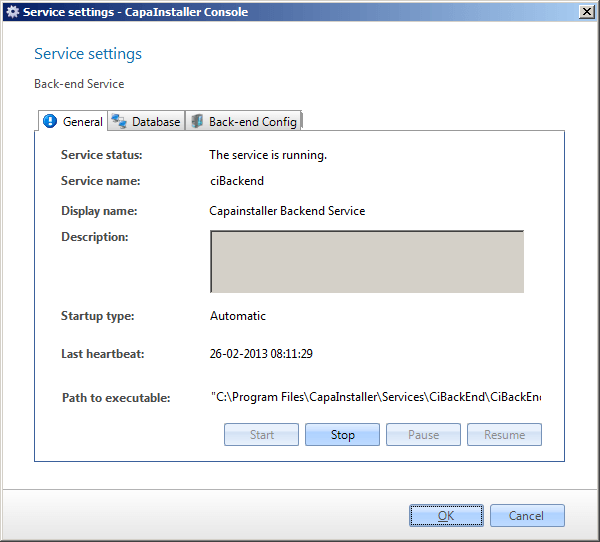
| Element | Description |
|---|---|
| Service status | Status of the Back-end Service, as shown in Services in Windows. |
| Service name | The name of the service used by the operating system. |
| Display name | The name shown in Services in Windows. |
| Description | Description of the service. |
| Startup type | Automatic, manual, or disabled. The default value is automatic. |
| Last heartbeat | The time of the last heartbeat from the service. |
| Path to executable | The full path to the program that the service starts. |
Database
Section titled “Database”On the Database tab, you change the authentication method to the SQL server.
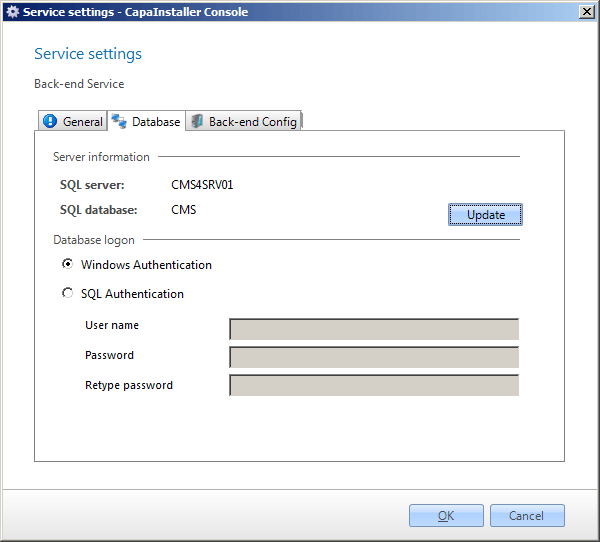
| Element | Description |
|---|---|
| SQL server | The SQL server that the Back-end Service connects to. |
| SQL database | The SQL database that holds the CapaInstaller database. |
| Update | Updates the service configuration with the current database. |
| Windows authentication | The Back-end Service connects to the database with the computer account of the server. |
| SQL server authentication | The Back-end Service connects to the database with the credentials in the User Name and Password fields. |
| User Name | The user name used to connect to the database when SQL server authentication is selected. |
| Password | The password for the user name. |
Communication
Section titled “Communication”On the Communication tab, you change the URLs and the SSL certificate of the service.
| Element | Description |
|---|---|
| Internal Url(s) | The URLs used to communicate with the service from internal networks, one per line in prioritized order. |
| Public Url(s) | The URLs used to communicate with the service from public networks, one per line in prioritized order. |
| SSL Certificate | The certificate used for https:// URLs. You must select a certificate if you use an https:// URL. |
| Expires on | The expiry date of the selected certificate. |
| Apply Certificate Update to | Applies a certificate change to this service only, to all services on the server, or to all services on all servers. |
For more information, see Use HTTPS in Backend, Frontend & OS Deployment Service.
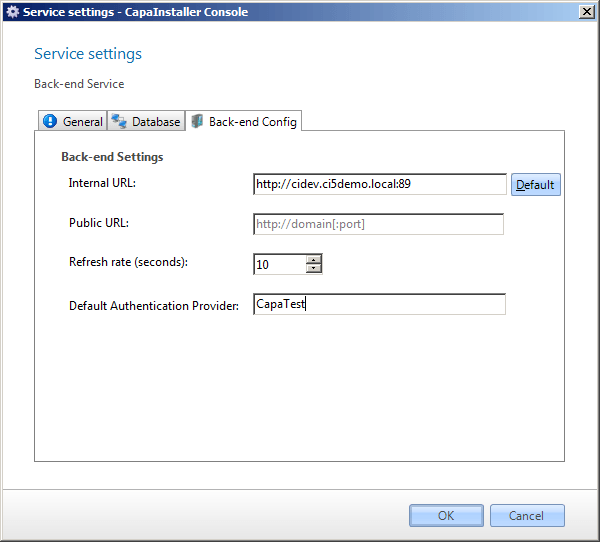
Configuration
Section titled “Configuration”| Element | Description |
|---|---|
| Refresh rate (seconds) | The number of seconds between each refresh of the settings from the database. |
| Default Authentication Provider | The domain that user names entered without domain information are validated against. |
Click OK to save your changes, or Cancel to close the dialog without saving.
Remove the service
Section titled “Remove the service”You can’t remove a Back-end Service while other services are linked to it. Link the OS Deployment and MDM services to another Back-end Service first. See Delete Back-end Service.