The following is a description of a PXE server and of the window used to create a new PXE server. The CapaInstaller PXE server is a generic PXE solution that uses DHCP and a TFTP service. The PXE server works like this:
- A client requests a network boot. The DHCP server responds with the required PXE information.
- The client requests a file download.
- The TFTP server handles the request and offers the file to the client.
- The client loads the boot file and displays a menu or simply starts the customized Windows PE.
|
|
| Element |
Description |
| PXE Service |
OSD can use two different types of TFTP services to operate the PXE boot process. CapaInstaller ciBoot (CapaInstaller PXE Boot Service) This service requires DHCP servers to supply option 60 to PXE clients, if ciBoot and DHCP services are hosted on the same machine. See link below for details. Microsoft TFTPD (Trivial File Transfer Service) This service is available in Windows server versions prior to 2008, and requires the DHCP to supply option 66 and 67 to PXE clients. The service is supported for backward compatibility only, and we recommend using CapaInstaller PXE Boot Service instead |
|
|
| Element |
Description |
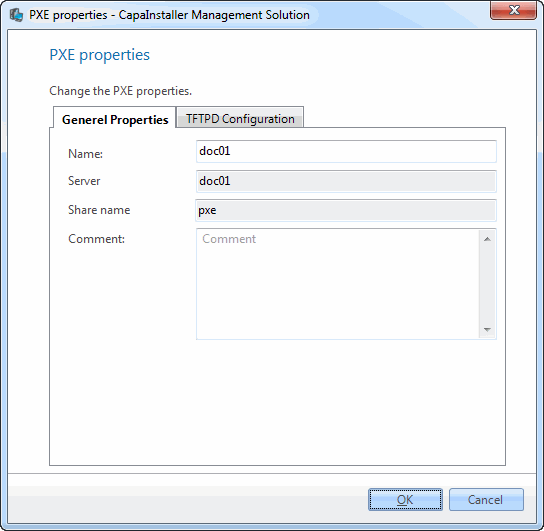
| Name |
Specify a name for the physical server. |
| Server |
Name of the physical server hosting the PXE service |
| Share name |
Name of the share used to access the PXE server configuration |
| Change description |
Enter a custom description that will be added to the change log. |
|
|
| Element |
Description |
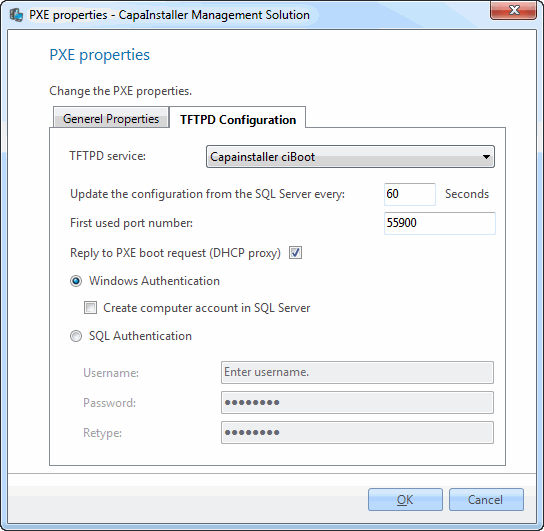
| TFTPD Service |
The service to be used to handle PXE requests. |
| Update config from SQL Server every |
ciBoot looks for changes in the configuration at this interval. The default is 60 seconds. |
| First used PortNr. |
Start of the port range that ciBoot uses when replying to PXE boot requests. The default is 55900. |
| Run DHCP Proxy |
Must be set for ciBoot to reply to PXE boot requests when hosted on the same machine as DHCP |
| Windows Authentication |
Use Windows Authentication when access the SQL server |
| Create computer account in SQL Server |
The computer account must be in SQL Server for Windows Authentication to work, checking this box will force OSD to create the account when clicking OK |
| SQL Authentication |
Use SQL Authentication when access the SQL server, should only be used in scenarios where Windows Authentication is not possible. |
|
|
| Element |
Description |
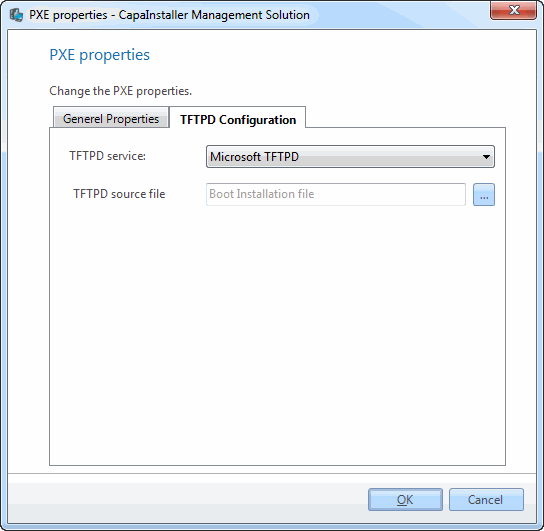
| TFTPD Service |
The service to be used to handle PXE requests. |
| TFTPD source |
The path to the binary TFTPD.EXE This file is located on the media for Windows Server or in the %windir%\system32\dllcache folder. Windows Server 2008 and later does not include this file. |
|
|
| Element |
Description |
| Boot configuration |
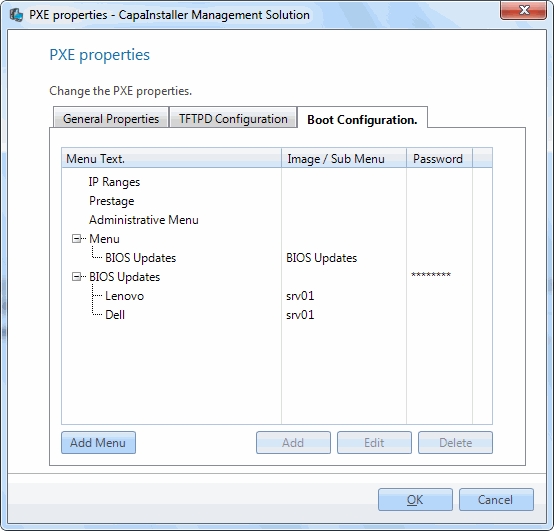
The Boot Configuration tab contains all custom menus and bootimages associated with the selected PXE server. Bootimages can be any kind of binary file that will enable a machine to perform a PXE boot, Linux, DOS floppy image or WinPE images. It is also possible to create custom menu entries for specific OSD servers, and all items can be protected with a password. |
|
|
| Element |
Description |
| IP Ranges |
Create custom boot items that will target IP ranges |
| Prestage |
Create custom boot items that will target machine with specific MAC addresses or specific models (SMBIOS model value) |
| Administrative Menu |
Create custom boot items that will be displayed as part of the administrative menu |
| Menu |
Create custom boot items that will be displayed as part of the menu |
| Custom menus |
Add additional menus to build more menu levels |
To create a PXE server, right-click the PXE Servers node and click Deploy PXE server…. Right-clicking a PXE server gives you the following options:
| Option |
Description |
| Open in Windows Explorer |
Opens the PXE server’s share. |
| Properties |
Shows the properties for the PXE server. For a detailed description of the individual fields, see above. |

