

Reinstall groups
Here you can establish any number of schedules for reinstalling computers set up using OS Deployment. These groups work similarly to Calendar Groups, except they control the reinstall schedule of computers added to each group. The forms to be used for creating a reinstall group are described below.
Properties
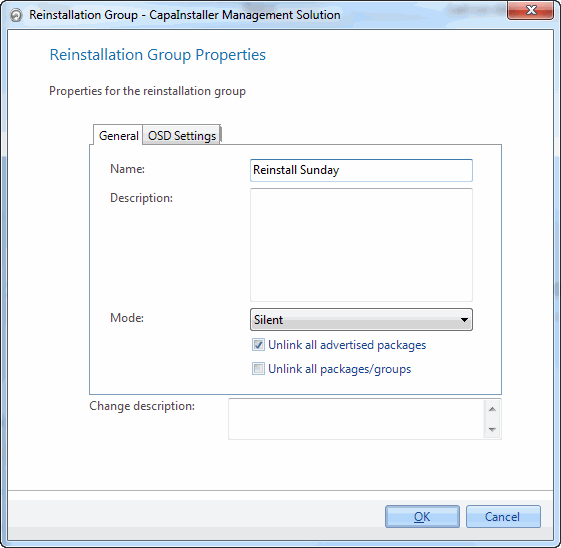
| Element | Description |
| Name | Name of the group |
| Description | Description of the group. |
| Mode | Choose whether or not the user needs to confirm the reinstall. 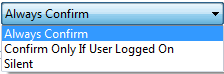 |
| Unlink all advertised packages | Choose whether or not all installed advertised packages should be unlinked from the computers. |
| Unlink all packages/groups | Choose whether or not the computer should be unlinked from all groups and packages. Checking this will disable the option regarding advertised packages. |
| Change description | The custom comment that will be added to the changelog. |
OSD Settings tab
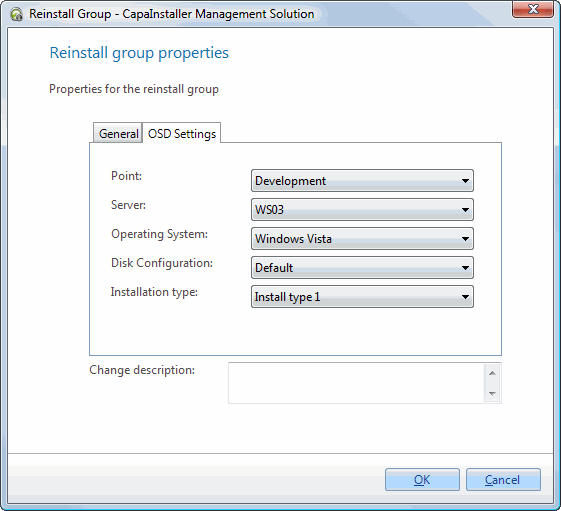
| Element | Description |
| Point | The OS Point being used. |
| Server | A server on the OS Point selected. |
| Operating System | An Operating System on the OS Point selected. |
| Disk Configuration | A Disk Configuration on the OS Point selected. |
| Installation type | An Installation Type. This is not mandatory. |
| Business Unit | The Business Unit the group belongs to. This is shown for information only. |
| CustomField1, CustomField2 | Values for the two custom fields that are used during the reinstallation. See Custom Fields Installation. |
| Change description | The custom comment that will be added to the changelog. |
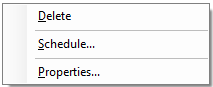
Right-clicking on a reinstall group brings the following possibilities:
| Element | Description |
| Paste computers | Only shown when the unit buffer contains computers. Adds the computers to the group. |
| Delete a group | Delete — Opens the delete group form. |
| Scheduling | Opens the schedule form for the group. Will Schedule when the clients in the Group will be reinstalled. |
| Reset Schedule’s last run | Resets the last run time of the group’s reinstall schedule. |
| Properties | Shows the properties for the group. |
Icons
| Element | Description |
 |
Reinstall Group. |
 |
Reinstall Group that has been scheduled. |
Related tasks
Section titled “Related tasks”| If you want to learn about… | You can… |
| OS Deployment points | OS Deployment points |
| OS Deployment servers | OS Deployment servers |
| OS Deployment Images | Images |
| disk configuration | Disk configuration |
| create a reinstall group | Create a reinstall group |