

Promote items
You can promote the items on one OS Deployment point to another OS Deployment point. Or promote packages from one Configuration Management Point to another. When you promote, the selected items are copied to the child OS Deployment point/Configuration Management Point. This option is only available if several OS Deployment points/Configuration Managements exist and their relations have been defined. In addition to deployment points, you can also promote images, scripts and models separately.
Promote OS Deployment items
Section titled “Promote OS Deployment items”| Step | Action |
|---|---|
| 1 | In the OS Deployment tree, right-click a deployment point, the Images, Models or Scripts node, or an individual image, model, driver or script, and click Promote. Promote is only shown when the point has a child point.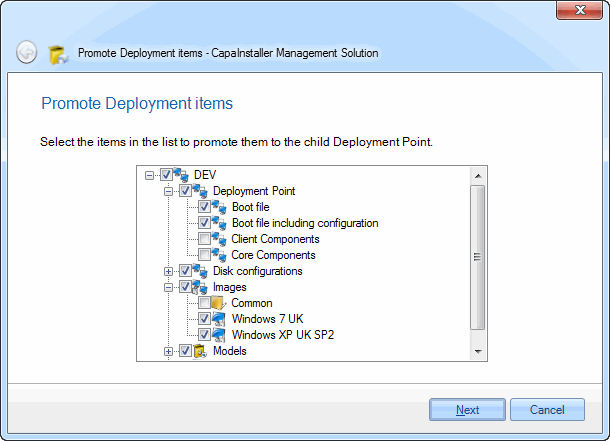 |
| 2 | On the Select Item(s) to Promote page, select the items you want to promote. |
| 3 | Enter a change description and click Commit. |
The items are copied to the child OS Deployment point.