

Use Export in OS Deployment
OSD lets you export images, models, drivers and scripts to a portable zip file, so you can transfer them to another installation. Points, servers and PXE servers can’t be exported.
| Step | Action |
| 1 | In the OS Deployment tree, right-click the item you want to export and select Export…. You can export a deployment point (its images, models, drivers and scripts), the Images, Models or Scripts node, or an individual image, model, driver or script. 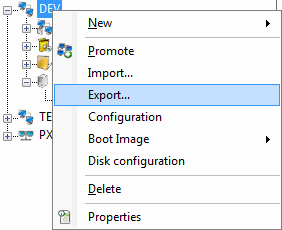 |
| 2 | Select the components you want to export 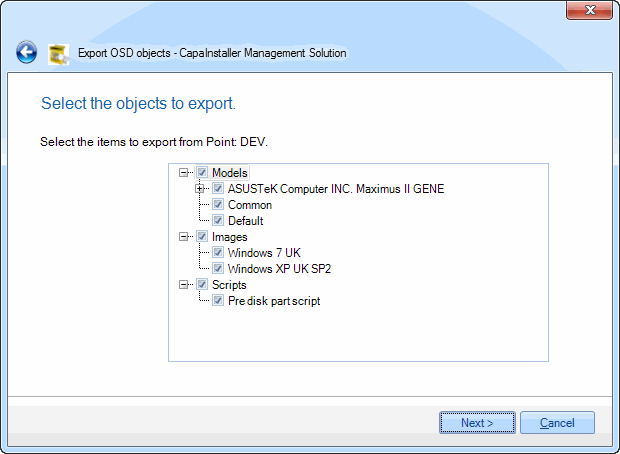 |
| 3 | Specify the destination zip archive to store the exported components in. By default, the file is named OSD_Export_<date>.ZIP. 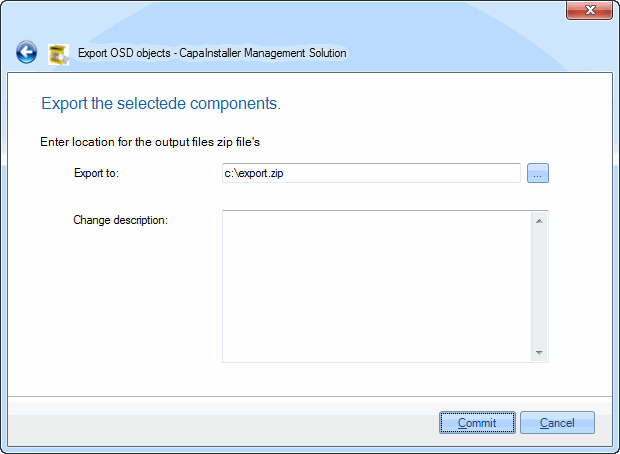 You can reuse a zip archive, but doing so may affect the performance of the export process. We therefore recommend creating new archives instead. You can reuse a zip archive, but doing so may affect the performance of the export process. We therefore recommend creating new archives instead. |
| 4 | Click Commit to begin exporting the selected components. This operation can take some time, depending on the size of the selected components. |