

Create Report for Linked Reports with Business Unit
Linked reports per Business Unit are created from reports that have a Business Unit parameter. You can use the predefined Business Unit reports, or your own report deployed with Export drilldown for Business unit. For more information, go to Reporting Services linked reports.
Use the predefined Business Unit reports
Section titled “Use the predefined Business Unit reports”- Select File → Deploy predefined reports to reporting services….
- Select the folder
/CapaInstaller Business Units/Templateas the report folder. - Under BusinessUnit, select the reports you want to use.
- Select OK.
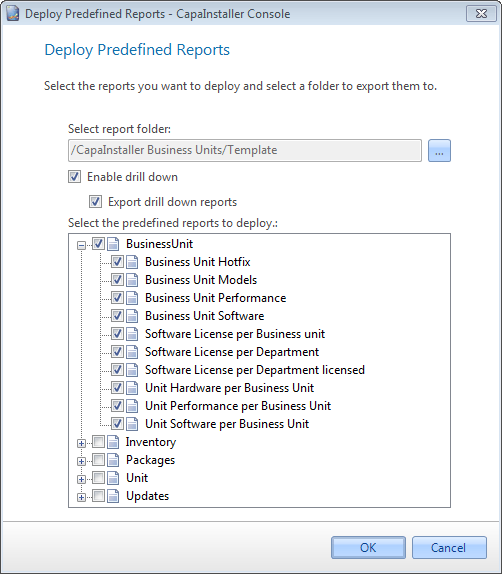
For more information, go to Deploy predefined reports to reporting services.
Use your own report
Section titled “Use your own report”- Create a report.
- Select File → Deploy to reporting services….
- Select Enable drill down and Export drilldown for Business unit. This adds the Business Unit parameter to the report.
- Select the folder
/CapaInstaller Business Units/Template, and then select OK.
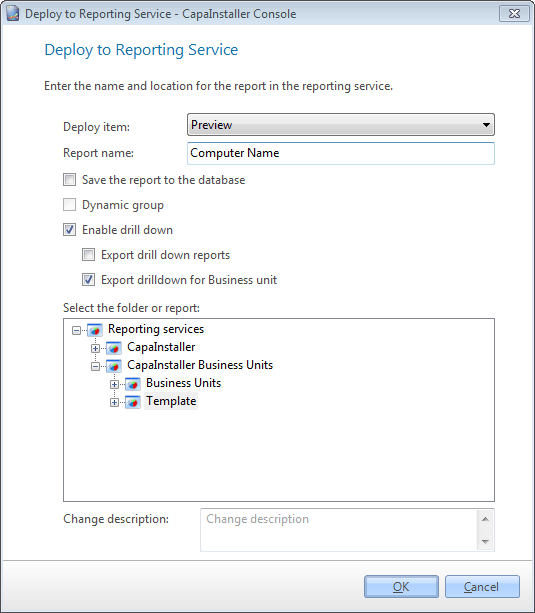
For more information, go to Deploy to reporting services.
Next step
Section titled “Next step”Create linked reports to Business units.
Related tasks
Section titled “Related tasks”| If you want to… | You can… |
|---|---|
| Create linked reports | Create linked reports to Business units to see how. |
| Manage report services | Manage reporting services to see how. |
| Learn what linked reports are | Reporting Services linked reports |