

Reporting Services Linked Reports
A linked report in Reporting Services is a report that links to an existing report. The linked report can have a default parameter value, so the user isn’t prompted for it.
CapaInstaller uses linked reports to give each Business Unit its own set of reports. You can create linked reports from the predefined Business Unit reports, or from your own report deployed with a Business Unit parameter. Each Business Unit gets a folder named after its ID, for example 00001, under /CapaInstaller Business Units/Business Units.
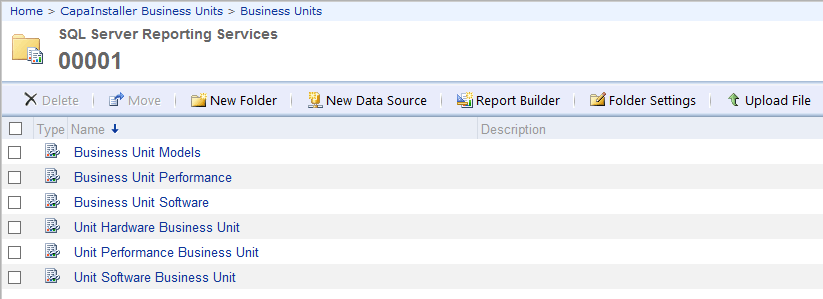
The following shows the linked reports for the predefined Business Unit reports in the folder of one Business Unit.
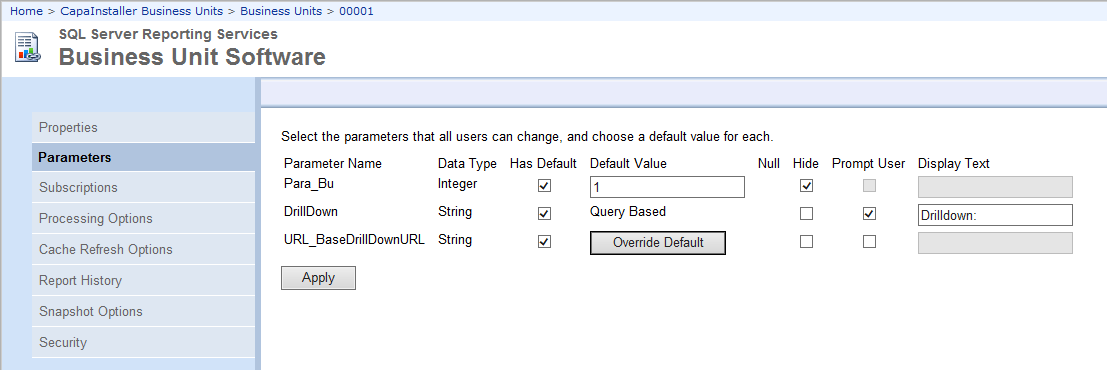
The following shows the parameters of the linked report Business Unit Software. The Business Unit parameter Para_Bu has a default value and is hidden.
The original Business Unit Software report in the Template folder prompts the user to select a Business Unit.

The linked report uses the default value and doesn’t prompt the user for a Business Unit.

Related tasks
Section titled “Related tasks”- Create report for linked reports with Business Unit - Prepare the source reports used for Business Unit linking.
- Create linked reports to Business units - Create the linked reports for your Business Units.