General menu description
The CapaInstaller Console has these menus: File, Edit, View, Go, Tools, Actions, and Help. Some menu items are always available. Other menu items are added by the plugin you’re working in, so the menus change when you switch plugins. This page describes the menu items that are available in all plugins.
For the menu items that each plugin adds, go to:
- Toolbar and menu description for Asset Management
- Toolbar and menu description for Configuration Management
- Toolbar and menu description for OSD
- Toolbar and menu description for Reporting
File menu
Section titled “File menu”| Menu item | Description |
|---|---|
| Exit | Closes the console. Shortcut: Alt+F4. If a plugin has unsaved data, you’re asked whether to close and discard the changes. |
Edit menu
Section titled “Edit menu”The Edit menu only contains items added by the active plugin. For example, OS Deployment and Patch Management add Select all, which selects all items in the folder that is selected in the tree view.
View menu
Section titled “View menu”| Menu item | Description |
|---|---|
| View Log → Current Log… | Opens the console log for the current session. Shortcut: F2. For more information, go to Console log file. |
| View Log → View History… | Opens the folder with the console logs from previous sessions. |
| Refresh | Refreshes the current view. Shortcut: F5. |
Go menu
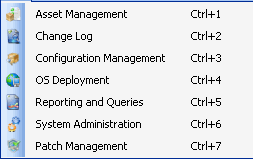
Section titled “Go menu”The Go menu lists the installed plugins. Select a plugin to switch to it. Each plugin has a keyboard shortcut, Ctrl+1, Ctrl+2, and so on, in the order the plugins appear in the navigation pane.
Tools menu
Section titled “Tools menu”| Menu item | Description |
|---|---|
| Change license… | Lets you enter a new license. The console restarts when you change the license. |
| Database options… | Opens the Database connection dialog, where you change the database that the console connects to. |
| Options… | Opens the Options dialog, where you change the settings for the console and for each plugin. |
Actions menu
Section titled “Actions menu”The Actions menu only contains items added by the active plugin.
Help menu
Section titled “Help menu”| Menu item | Description |
|---|---|
| CapaWiki | Opens the online CapaInstaller documentation in your browser. |
| CapaOne Dashboard | Opens the CapaOne Dashboard (https://dash.capaone.com) in your browser. |
| CapaOne Portal | Opens the CapaOne Portal (https://portal.capaone.com) in your browser. |
| Create Documentation… | Opens a tool that creates a Word document (.docx) describing your CapaInstaller installation. The tool can also collect the CapaInstaller logs in a .zip file. |
| License Information | Shows your license: the licensed amount, the number of licenses used, the number of named users, and when the license expires. |
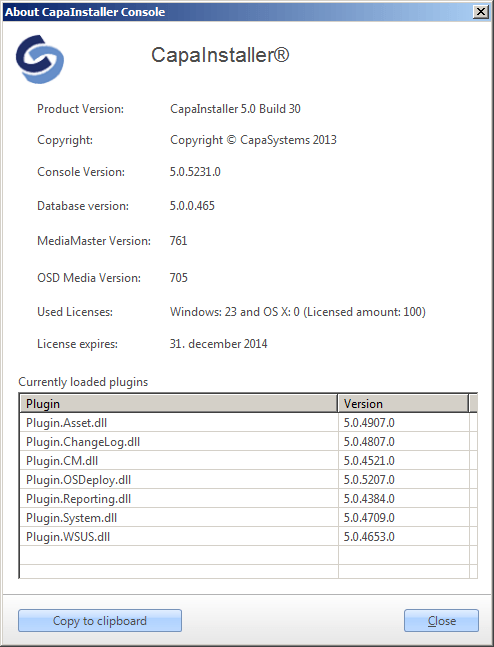
| About CapaInstaller… | Shows the product name, the console version, the database version, the MediaMaster and OSD media versions, and the loaded plugins with their versions. If the console finds a newer CapaInstaller update online, the dialog shows Update available next to the product name. Click Copy to Clipboard to copy the information, for example for a support case. |