

Synchronize between CapaOne and CMS Installation
You create and maintain deployment templates in the CapaOne portal. For this to work, CapaInstaller synchronizes images and disk configurations from your CapaInstaller installation to the CapaOne portal, and deployment templates from the CapaOne portal back to your installation.
Scheduled synchronization using a global task
Section titled “Scheduled synchronization using a global task”A replicator must be assigned the Synchronize CapaOne global task. You assign it in the System Administration plugin under Global Tasks. Right-click Synchronize CapaOne and select Assign replicator….
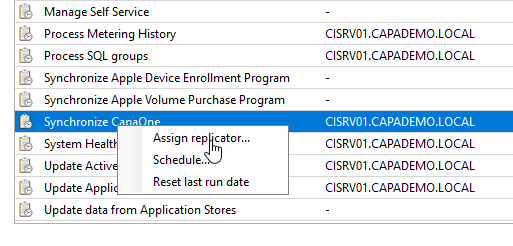
Configure a schedule with Schedule… based on how often your images, disk configurations and deployment templates change.
When you save, change or delete an image, a disk configuration or an installation type in the CapaInstaller Console, a synchronization is also requested automatically.
Immediate synchronization from the CapaInstaller Console
Section titled “Immediate synchronization from the CapaInstaller Console”-
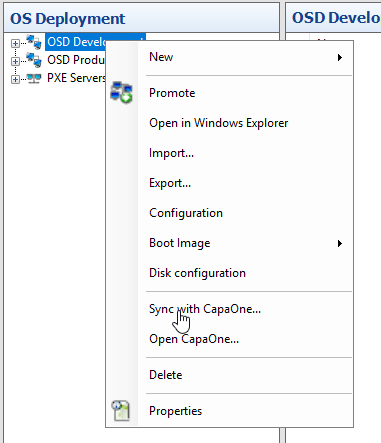
In the OS Deployment tree, right-click the OS Point and select Sync with CapaOne….
-
Optionally, enter a changelog comment, and then select OK.
The replicator that is assigned the Synchronize CapaOne global task performs a synchronization with CapaOne. If no replicator is assigned the global task, no synchronization is performed.