

Toolbar and menu description for OSD
The following is a description of the toolbar and menus in OS Deployment. The general menu items are explained in the general description for the console. The OS Deployment tree also has a right-click menu for each item. Those options are described on the page for each item, for example OS Deployment points.
Toolbar
| Element | Description |
 |
Creates a new OS Deployment Point. |
 |
Creates a new OS Deployment Server. |
 |
Creates a new Image. |
 |
Creates a new Model. |
 |
Creates a new Driver. |
 |
Creates a new Script. |
 |
Creates a new PXE boot server. |
Menus
 |
 |
 |
 |
 |
 |
| File menu | Description |
| New Create a new OS Deployment point Create a new OS Deployment server Images Create a new model Create a new driver Create a new script Create a new PXE server | Creates a new item of the selected type. 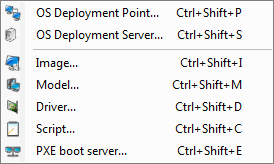 |
| Save script | Lets you save changed scripts. |
| Create a boot image | Lets you create a boot file. |
| Update an OS Deployment point | Lets you update Deployment Points. |