

CapaWinUpgrade - Control Groups
Control groups
Section titled “Control groups”Control groups are used to specify the target version for Windows in-place upgrades.
Link the endpoint or endpoints that you intend to upgrade, to the control group corresponding to the desired target version.
If an endpoint isn’t linked to a control group, the CapaWinUpgrade packages fail with an error saying that the computer has not been linked to a control group.
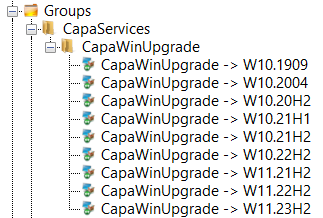
How control groups are created
Section titled “How control groups are created”The CapaSystems Services Cloud Updater package creates the control groups. Each time the package runs, it creates a control group for every Windows version listed in its installation script, if the group doesn’t already exist.
- The control groups are static computer groups.
- Each group is named
CapaWinUpgrade -> <Windows version>, for exampleCapaWinUpgrade -> W11.23H2. - The groups are placed in the CapaServices → CapaWinUpgrade group folder.
In the installation script, each Windows version is written as <version> <language>, for example W11.23H2 EN-US. Separate multiple versions with a semicolon: W11.23H2 EN-US;W11.23H2 DA-DK.
To add a new Windows version, see How-to Add a New image to the CapaSystems Cloud Updater Package.
Related
Section titled “Related”- CapaWinUpgrade - Computer Packages — the packages that run the upgrade once a control group is linked
- Windows Feature Upgrade Guidelines — what to check when an upgrade fails