

Work with application groups
Introduction
Section titled “Introduction”After the creation of the application groups, you can add licenses, rename, add queries, and delete the groups. Click any link to learn more about working with application groups. The following functionality is also available by right-clicking on an application group.
Related tasks
Section titled “Related tasks”| If you want to… | You can… |
| Create an application group | Create an application group to see how. |
| Add licenses to an application group | Work with application group license to see how. |
| Add a query | Create a query to see how. |
| Delete a group | Right-click on the application group and click Delete. |
| Rename an application group | Rename an application group to see how. |
| Manage the individual software in application groups | Right-click on the software in the group and you can click Move to group…, Move to new group…, Unlink from group, or Delete. 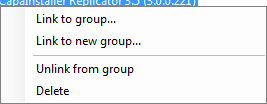 Work with links to learn about group links. Click Delete to delete the software. Work with links to learn about group links. Click Delete to delete the software. |