

Deploy OS Deployment Service
This page describes how to deploy the OS Deployment Service.
Deploy the service
Section titled “Deploy the service”- In System Administration, expand Services, right-click the OS Deployment Service folder, and select Deploy OS Deployment Service….
- On the prerequisite page, make sure that the Back-end Service is passed. Click the status link to deploy a missing Back-end Service.
- Enter the target server and click Validate. To deploy offline, select Enable offline installation.
- Enter the Internal Url(s) and, if needed, the Public Url(s) of the service, including the port. The default port is
5030for HTTP and443for HTTPS. - Configure the service, the PXE server, and the TFTP daemon. See OS Deployment Service configuration options.
- Select how the service files are copied to the target server, and complete the wizard.
The service appears under Services in System Administration.
OS Deployment Service configuration options
Section titled “OS Deployment Service configuration options”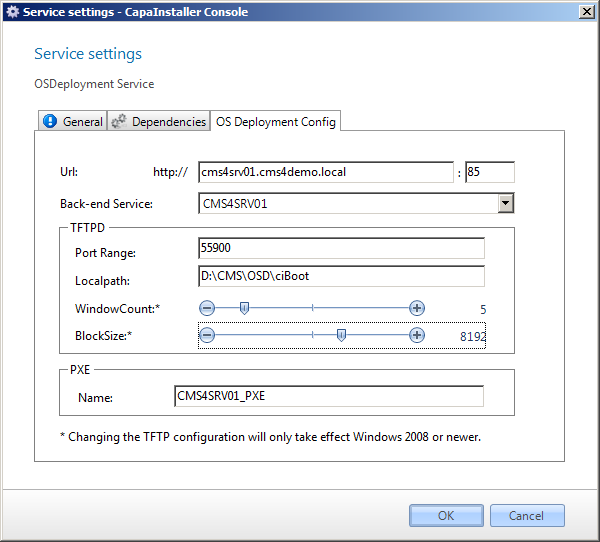
| Element | Description |
|---|---|
| Back-end Service | The Back-end Service that the OS Deployment Service uses. |
| File cache | The folder for the file cache. The default is %temp%\OsDeploy. |
| Refreshrate | The number of seconds between each refresh of the settings. |
| Enable PXE Server (DHCP proxy) | Enables the PXE server of the service. |
| Name (PXE) | The name of the PXE server. The wizard suggests the server name followed by _pxe. |
| Enable TFTP Deamon | Enables the TFTP daemon of the service. |
| Port Range | The port range used by the TFTP daemon. |
| Localpath | The local path of the TFTP daemon. The default is C:\CiBoot. |
| Share Name | The share name of the TFTP folder. The default is CIBOOT. |
| Default Window Size* | The number of blocks sent before the service expects an acknowledgment from the client. |
| Default Block Size* | The size of the blocks sent from the service to the client. |
* Changing the TFTP configuration takes effect only on Windows Server 2008 or newer.
If the server already has a TFTP daemon or a PXE server, the wizard shows the existing settings, and you can’t change them.