

Enable Reporting Services Drill Down
Reporting Services drill-down is a hyperlink in a report column that opens another report with more information about the item you select. In CapaInstaller, you can drill down on a computer, user, device, software, software group, update, package, or device application. When a report with drill-down support is displayed, you select the drill-down report in a drop-down list. For more information, go to Reporting services drill down.
-
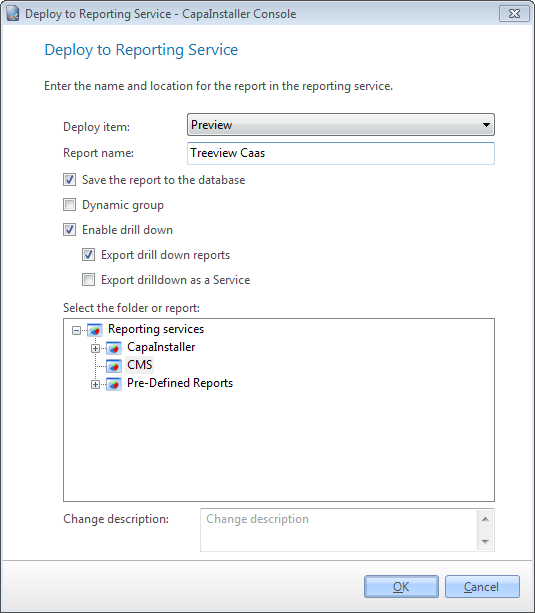
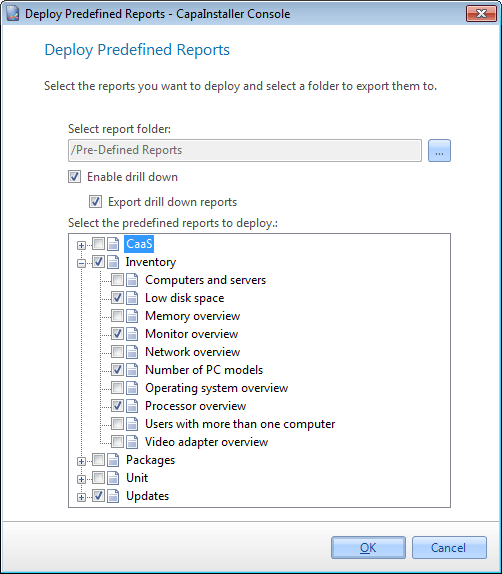
Select File, and then select Deploy to reporting services… or Deploy predefined reports to reporting services….
-
To enable drill-down, select Enable drill down.

-
Choose whether to deploy the drill-down reports with Export drill down reports. If you clear it, the drill-down reports must already exist on the Reporting Services server, or the drill-down links won’t work.
-
In Deploy to reporting services, you can also select Export drilldown for Business unit. This adds a Business Unit parameter to the report, which you need to create linked reports per Business Unit. For more information, go to Create report for linked reports with Business Unit.
-
Complete the deployment and select OK.
The drill-down reports are deployed to the folder /CapaInstaller/Drill down on the Reporting Services server. If they already exist, you’re asked whether to overwrite them.
Related
Section titled “Related”- Reporting services drill down - What drill down is and how it links reports together.
- Deploy to reporting services
- Deploy predefined reports to reporting services