

Define Report Criteria
After you have selected the items for a report, use criteria to limit the result to the units you want.
Add a criterion
Section titled “Add a criterion”-
Select the Reporting and Queries plugin.
-
Select Tools → Define criteria…. You can also right-click a selected item in the tree view and select Define criteria….
-
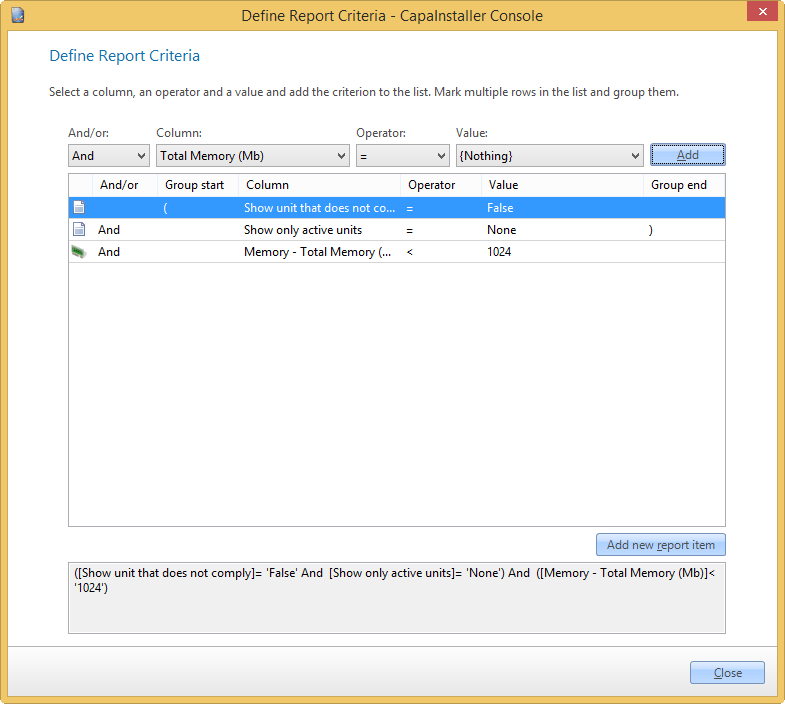
Select And/or, Column, Operator, and Value for the criterion. And/or isn’t available for the first criterion.
-
Select Add. The criterion is added to the list, and the full expression is shown below the list.
-
Select Close.
The list always contains two built-in criteria:
| Criterion | Description |
|---|---|
| Show unit that does not comply | Set to True to show the units that do not meet the other criteria, instead of the units that do. |
| Show only active units | Limit the result to units with the status Active, Inactive, or Unassigned. None shows units with any status. |
Group criteria
Section titled “Group criteria”- Select two or more criteria in the list.
- Right-click the selected rows.
- Select Group selected.
To remove groups, right-click the list and select Delete selected groups or Delete all groups.
Change a criterion
Section titled “Change a criterion”- Right-click a criterion.
- Select Edit criteria.
- Make your changes.
- Select Update.
Delete a criterion
Section titled “Delete a criterion”- Right-click a criterion.
- Select Delete criteria.
Add a criterion on another report item
Section titled “Add a criterion on another report item”To add a criterion on another item in the report, select Add new report item. For more information, go to Add new report item criteria.
To filter on unit properties such as Department, Unit State, or Business Unit, add them to the report from Unit Inventory in the Hardware tree view. For more information, go to Report static criteria.
Related tasks
Section titled “Related tasks”| If you want to… | You can… |
|---|---|
| Create a custom made report | Create a report to see how. |
| Preview a report | Preview a report to see how. |
| See recent reports | Select File → Recent reports. A list of the recently used reports is shown. |
| Set up columns | Column setup to see how. |
| Export to reporting services | Deploy to reporting services to see how. |
| Change column order | Reporting column order to see how. |
| Open an existing report | Open an existing report to see how. |