The following is a description of how to create a new script in CapaInstaller OSD.
| Step |
Action |
| 1 |
In the OS Deployment tree, expand the OS Deployment point, right-click Scripts, and then click Create script…. |
| 2 |
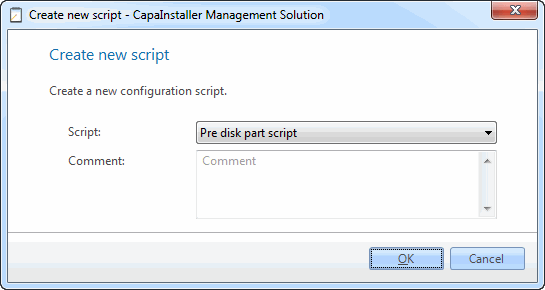
The Create new script window appears.
 |
| 3 |
Choose the relevant script type and click OK. Each OS Deployment point can hold one script of each type. |
| 4 |
Right-click the new script and click Edit script. Enter the script contents. |
| 5 |
Click OK. |
|
| During script creation the following registry keys can be read from the registry key: HKEY_LOCAL_MACHINE\SOFTWARE\CapaSystems\CapaInstaller\OSD. All the values from this registry key will be copied to the deployed client registry before rebooting into MiniSetup Please note that this occurs just before running any PreBootScript, any changes made in PreBootScript will not be copied over. |
|
|
| Values |
Description |
| IsLocalReinstallation |
Reserved for future use |
| AlternativeConfigPath |
Use specified file to read startup values, this will force OSD to read values from alternate file instead of using osdloader.ini |
| OSDUNCPath |
The path where OSDGUI.exe was found |
| NewComputerName |
Contains the value to be used as the name of the client. During the deployment, the client will have a randomly generated name, which is stored in the variable COMPUTERNAME. |
| ImageName |
The name of the image be applied. |
| DiskConfig |
The disk configuration applied to the client. For the available settings, see Disk configuration. |
| DiskIndex |
If a machine contains more than one disc, this value will shift the deployment focus to the discindex selected, OSD will not change this value automatically |
| IPAddress |
The IP address currently assigned to the client. |
| BootServer |
The server from which OSD is running. If this value is empty, the deployment process is running from a DVD/CD or a bootable USB device. |
| ModelName |
The filtered model ID pulled from SMBIOS. This is the value that determines which drivers will be added to the client. |
| MachineType |
This value indicates if the client is a laptop or a workstation. |
| PCType |
This variable holds the installation type. |
| SkipGUI |
Set to true to suppress the user input form |
| OSDGUIRootDrive |
The drive letter where OSDGUI was found |
| DeployToDrive |
The drive letter where the image is being deployed |
| ImageOSType |
The type of OS in the selected image. Possible values: Windows10x64, Windows11x64, Windows2019x64, Windows2022x64, Windows2025x64. If the OS type is not detected correctly, the value is set to Undetected or Unknown. |
| IsReinstallation |
Indicates If OSD is performing a reinstallation |
| DisableCMSClientInstallation |
Set this value to True to prevent OSD from deploying a CMS agent automatically |
| WindowsSystemRoot |
Windows root of the deployed image |
| CustomMessage |
When a script is running OSD will display this value as the state message on the UI |
|
|
| Script |
Description |
| PreGUIScript |
This script runs before OSDGUI shows the user input form. To suppress this form use the Registry value SkipGUI. ImageName, NewComputerName and DiskConfig values must contain valid settings for OSD when the script completes, otherwise OSD will unable to continue |
| PreInstallScript |
This script runs when the user clicks Install in the OSD client, after the computer name, image, disk configuration and installation type have been selected, and before the deployment starts. It runs before PreDiskPartScript. |
| PreDiskPartScript |
This script runs immediately after the user clicks Install to activate the deployment process. Any further user interaction should be handled using this script. The script runs before any changes are made to the system disc. Note that any data saved to disc should be written to the x: and not to the c: drive. To keep these data for later use during MiniSetup etc. make sure that you use one of the later scripts to transfer these data from x: to c: before reboot.
All data written to x: during the deployment process will be discarded when rebooting. |
| PreImageScript |
This scripts runs after the partitioning operation is complete, but before any data is transferred to the new file system. Note that any files written to the disc at this point may be overwritten by any files included in the .wim file. |
| PreDriverCopyScript |
This scripts runs before any drivers are copied onto the client. |
| PrePatchScript |
This scripts runs before any changes are made to the client registry or sysprep files. |
| PreBootScript |
This scripts runs as the final part of the deployment process. |
| PostInstallScript |
This script runs as part of the minisetup process |
| OSDCustomLib |
This file can contain custom functions to be included into scripts. |
The scripts are saved as Windows Script Files (.wsf) and run with wscript.exe. OSDCustomLib is saved as a .cis file. Script log files are written to Program Files\CapaInstaller\Client\Logs in WinPE.

