

Manage Global Replicator tasks schedule
Global tasks are Replicator tasks that apply to the whole CapaInstaller system rather than to a single Management Server. You set their schedules in System Administration.
Schedule a global task
Section titled “Schedule a global task”-
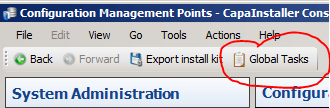
In System Administration, click Global Tasks in the toolbar.
-
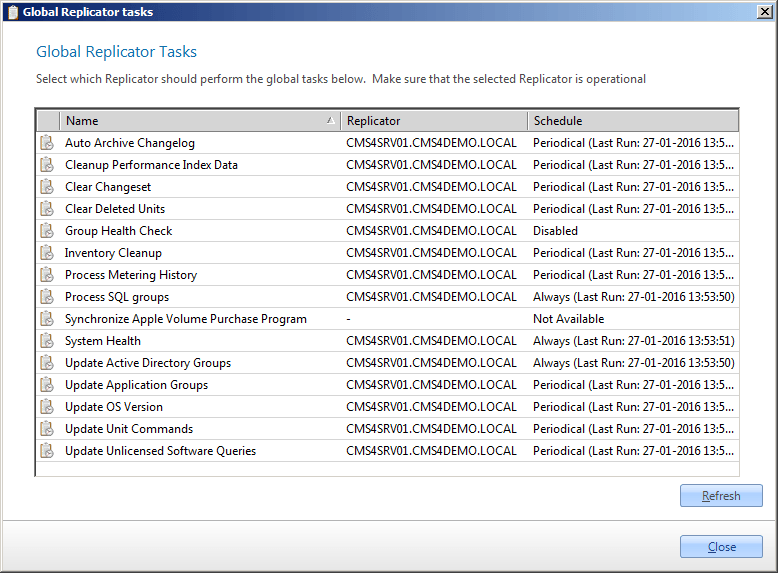
Right-click a task and select Schedule. To choose which Replicator runs the task, select Assign Replicator… instead.
-
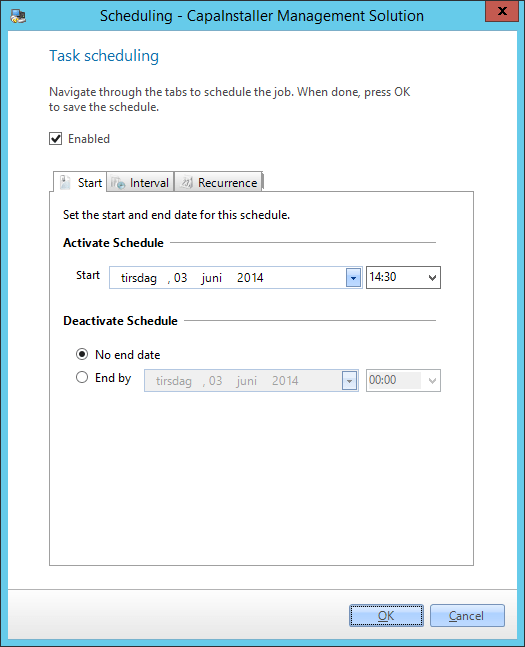
Set the schedule and click OK.
Global tasks
Section titled “Global tasks”The table describes each global task and its default schedule.
| Element | Description | Default Schedule | Other related info |
|---|---|---|---|
| Auto Archive Changelog | Auto archives changelog entries from the database to a CSV file for better console performance. | Periodical (Daily) | Change log options |
| Cleanup Performance Index Data | Cleans up PerformanceGuard index data that the system no longer needs. | Periodical (Daily) | Performance Guard Integration |
| Clear Changeset | Clears changeset. A changeset is used to keep the console updated with information from the Capainstaller system. | Periodical (Daily) | |
| Clear Deleted Units | Clears units marked as deleted units. Deleted Computer and user units are not removed from the backend when deleted from the console because of files located on the linked management server. It is marked as deleted and then later deleted from the backend by this task. Mobile Devices are deleted from the entire system when deleted from the console because they do not have any files on the Management Server |
Periodical (Daily) | Delete a unit in Configuration Management |
| Group Health Check | Performs a group health check that makes sure that the packages linked to a group are still linked to the units linked to the same group. Note: This process is disabled by default because the functionality it provides is standard behavior. By enabling this you could see a lot of units getting relinked to packages thru the groups it is linked to. |
Disabled | |
| Inventory Cleanup | Cleanup of inventory data that is not linked to any computer or devices. | Periodical (Daily) | Inventory Management |
| Process Metering History | Processes metering history data that is used within the solution | Periodical (Daily) | Metering history |
| Process SQL Groups | Processes the dynamic inventory groups in the system. It is this task that validates what units has to join what groups based on their inventory | Always | Dynamic groups |
| Synchronize Apple Volume Purchase Program | Synchronizes with Apple regarding info needed for the Volume Purchase Program | Disabled | Apple Volume licenses with CapaInstaller MDM |
| System Health | The system health task processed information about the system health and creates system notifications based on what it finds | Always | System Notification |
| Update Active Directory Groups | Active Directory groups are updated by this task. The groups are update based on what information is found in the active directory | Always | AD groups |
| Update Application Groups | An update of application groups is needed to populate the application groups in Asset Management | Periodical (Daily) | Work with application groups |
| Update OS Version | Updates the list of iOS versions from Apple into the CapaInstaller System | Periodical (Daily) | |
| Update Unit Commands | Updates the unit commands for Mobile Devices. The process checks the system and sets unit commands (HW Inventory, SW Inventory etc.) for mobile devices. Runs thru the mobile devices and schedules an inventory collect. This task will maximum run once every 30 min. The Mobile Device Call Home task is required to maintain the Agents Online information for mobile devices |
Always | |
| Update Unlicensed Software Queries | Update unlicensed software queries are used to manage data related to asset management data | Periodical (Daily) | Use unmanaged software queries |
| Auto Upgrade Applications | The Apps with Auto Update Application enabled will be reinstalled on linked devices if there exists a newer version in the Appstore | Disabled | How to Manage Automatic Application Updates |
| Update data from Application Stores | The Apps with Auto Update Application enabled will be updated with versions, features, and size information from Appstore | Disabled | How to Manage Automatic Application Updates |
| Assign Apple Volume Purchase Program Licenses | Assigns Apple Volume Purchase Program licenses to apps that are waiting for a license, so the apps can be installed. | Disabled | How to Manage Apple Volume Purchase Program |
| Synchronize Apple Device Enrollment Program | Synchronizes devices and profiles with Apple Business Manager (Apple DEP). | Disabled | How to use Apple Business Manager (Apple DEP) |
| Manage Self Service | Sends the Self Service Portal link to devices that are linked to a self-service configuration and don’t have the current link. | Always | |
| Synchronize CapaOne | Synchronizes data with CapaOne, for example Android Enterprise devices and deployment configurations and templates. Created when you upgrade to CapaInstaller 6.1 or later. | Periodical |