

Non-Unique UUID
Every client is identified in the database by its UUID (Universally Unique Identifier). The manufacturer writes the UUID into the firmware of the motherboard, and Windows reports it through WMI.
Sometimes the UUID isn’t unique, so multiple computers report the same UUID. This happens because of a faulty production process, or because the computer is old and never got a UUID during manufacturing.
How CapaInstaller handles a non-unique UUID
Section titled “How CapaInstaller handles a non-unique UUID”CapaInstaller keeps a list of known non-unique UUIDs. When a client reports an empty UUID, or a UUID that is on the list, CapaInstaller creates a replacement UUID for the client:
- It combines the UUID template with the MAC address of a physical network adapter.
- If no usable MAC address is found, it combines the template with the serial number of a fixed hard disk.
A replacement UUID that matches the list is also rejected, and the next network adapter or disk is tried.
The list is used by the CapaInstaller Scripting Library, the agent health check, CapaInstallerAgentSetup.exe, the WinPE inventory and OS Deployment.
Maintain the list of non-unique UUIDs
Section titled “Maintain the list of non-unique UUIDs”- In System Administration, select Actions → Non Unique UUIDs….
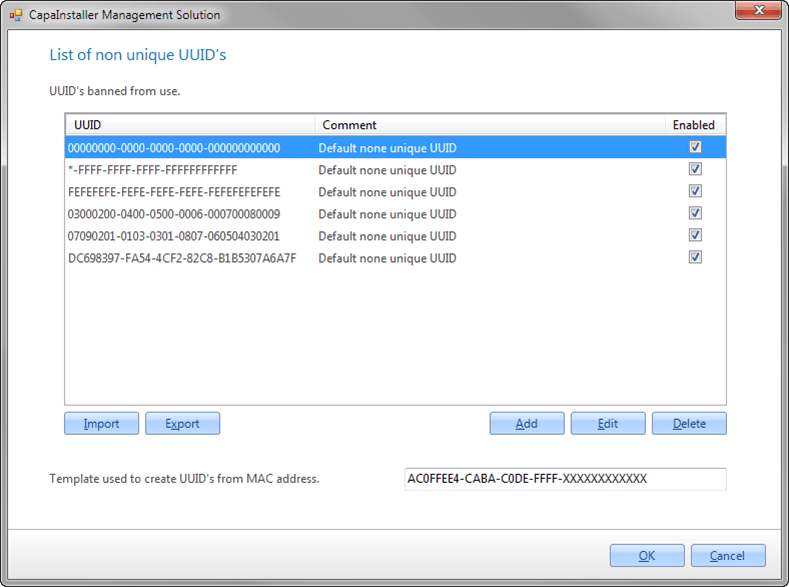
- In List of non unique UUID’s, use Add, Edit and Delete to maintain the UUIDs. Each entry has a UUID, a comment and an enabled state. Right-click an entry to set it to Enabled or Disabled.
- Optionally, change the Template used to create UUID’s from MAC address. The default template is
AC0FFEE4-CABA-C0DE-FFFF-XXXXXXXXXXXX, where theXcharacters are replaced by the MAC address or disk serial number. - Click OK.
To move the list to another installation, use Export and Import.
The Replicator Service writes the list and the template to the file FalseUUIDs.xml in the Resources folder of each Management Server. From there, the file is copied to the clients (Client\Resources\FalseUUIDs.xml in the CapaInstaller installation folder) and used every time the scripts run. Because the list is maintained in the console, you can add new non-unique UUIDs without changing any scripts.
The list supports wildcards. For example, *-FFFF-FFFF-FFFF-FFFFFFFFFFFF matches every UUID that ends with -FFFF-FFFF-FFFF-FFFFFFFFFFFF.
Built-in fallback list
Section titled “Built-in fallback list”If the FalseUUIDs.xml file can’t be found or read, the scripts use this built-in list:
00000000-0000-0000-0000-000000000000*-FFFF-FFFF-FFFF-FFFFFFFFFFFFFEFEFEFE-FEFE-FEFE-FEFE-FEFEFEFEFEFE03000200-0400-0500-0006-00070008000907090201-0103-0301-0807-060504030201DC698397-FA54-4CF2-82C8-B1B5307A6A7F
Known non-unique UUIDs
Section titled “Known non-unique UUIDs”These non-unique UUIDs have been found so far:
00000000-0000-0000-0000-000000000000FFFFFFFF-FFFF-FFFF-FFFF-FFFFFFFFFFFFFEFEFEFE-FEFE-FEFE-FEFE-FEFEFEFEFEFE03000200-0400-0500-0006-00070008000907090201-0103-0301-0807-06050403020156F49712-FFFF-FFFF-FFFF-FFFFFFFFFFFF93309712-FFFF-FFFF-FFFF-FFFFFFFFFFFF50FB9712-FFFF-FFFF-FFFF-FFFFFFFFFFFF61F39712-FFFF-FFFF-FFFF-FFFFFFFFFFFFDC698397-FA54-4CF2-82C8-B1B5307A6A7F52309712-FFFF-FFFF-FFFF-FFFFFFFFFFFF8E275844-178F-44A8-ACEB-A7D7E5178C63890E2D14-CACD-45D1-AE66-BC80E8BFEB0F00020003-0004-0005-0006-000700080009