

Create a power scheme
A power scheme contains Windows power settings, each with a value for when the computer is plugged in and a value for when it runs on battery. Some settings are only available on some versions of Windows. Settings that the operating system doesn’t support are ignored when the power scheme is applied, so you can use the same power scheme on computers with different operating systems.
Create the power scheme
Section titled “Create the power scheme”-
In Configuration Management, expand your root Configuration Management Point, then Groups → System Groups → Power Management.
-
Right-click Power Schemes and select Create….
-
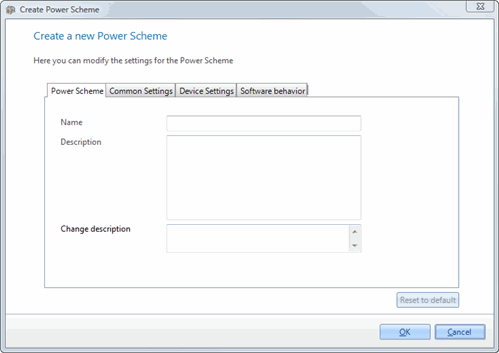
On the Power scheme tab, enter a Name and, optionally, a Description and a Change description.
-
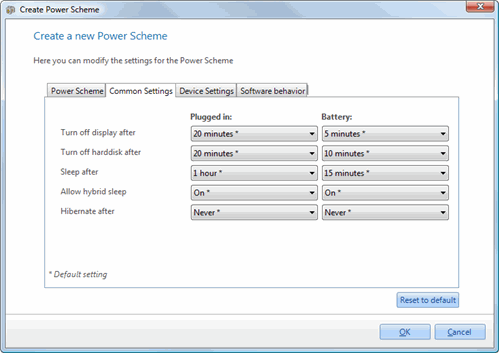
On the Common settings tab, set Turn off display after, Turn off hard disk after, Sleep after, Allow hybrid sleep and Hibernate after.
-
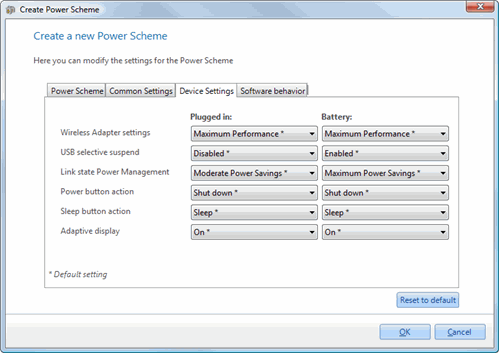
On the Device settings tab, set Wireless adapter settings, USB selective suspend, Link state Power Management, Power button action, Sleep button action, Adaptive display and Lid close action.
-
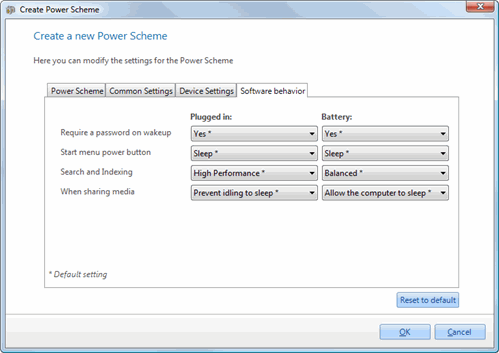
On the Software behavior tab, set Require a password on wakeup, Start menu power button, Search and indexing and When sharing media.
-
Click OK.
All settings start at their default value, marked with an asterisk (*). To set all settings back to the default values, click Reset to default.
The power scheme appears under Power Schemes. To use it, add it to a power scheme group.