

Server Manager
The PerformanceGuard Server Manager is a tool for management of PerformanceGuard installations. It shows the status of the PerformanceGuard services, and lets you start and stop them:
- Frontend (the PerformanceGuard Frontend Server service)
- Backend (the PerformanceGuard Backend Server service)
- Display (the PerformanceGuard Web Server service)
- Display2 (the PerformanceGuard Web Server 2 service)
Select Start or Stop next to a service, or select Start All or Stop All.
You find the Server Manager on the Start menu, under PerformanceGuard Server Manager.
Procrun service properties
Section titled “Procrun service properties”It’s possible to manage PerformanceGuard service properties via procrun. Procrun is a set of applications that let Windows users wrap Java applications as Windows services.
That way you’ll be able to control advanced service properties, for example JVM parameters like heap sizes and memory pool sizes for the PerformanceGuard Web Server 2 service:
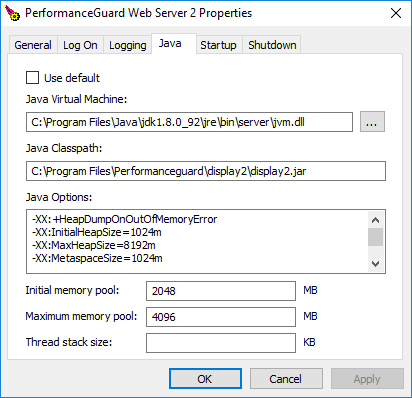
For more information about procrun, and configuration of service properties via procrun, see for example the procrun information on Apache Commons. To give the services more memory, see Allocate More Memory to Services.