

Upgrade to Version 6.1.27 from Older Versions
If you want to upgrade PerformanceGuard versions older than version 6.1.27 to the latest version, you need to first upgrade your old version to version 6.1.27, and then upgrade version 6.1.27 to the latest version.
The following describes how to upgrade all server components in your PerformanceGuard system from old versions to version 6.1.27.Follow the all of the procedures step-by-step unless you are a very experienced user.
[[Database-Upgrade-Scripts.zip]]
Prerequisites
Section titled “Prerequisites”Before the upgrade you need to have the following ready:
- Your Windows credentials in order to access computers with PerformanceGuard installed
- Your SQL Server administrator credentials in order to access the MS SQL-server
- SQL Server credentials in order to access the PerformanceGuard backend server database
- SQL Server credentials in order to access the PerformanceGuard frontend server database
- A downloaded PerformanceGuard installation file
Stop Services
Section titled “Stop Services”Stop the following services:
- PerformanceGuard Backend Server
- PerformanceGuard Web Server
- PerformanceGuard Frontend Server
Back Up Databases
Section titled “Back Up Databases”A backup is important to secure your existing databases. See Back Up Database.
Upgrade Database
Section titled “Upgrade Database”If you are upgrading through multiple versions, it’s sufficient to install the latest software and upgrade the database according to the following schema:
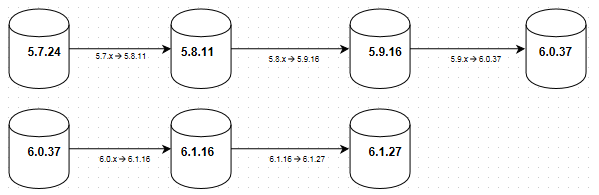
_XXXPatches.sql can be re-applied without any problems
| Installed Version | Script for Upgrading to Next Version |
|---|---|
| Latest PerformanceGuard | Follow the instructions in Upgrade Version 8.1 or Newer. |
| 6-1-27 | BACKEND_610Patches.sql FRONTEND_610Patches.sql |
| 6-0-37 | BACKEND_600to610.sql FRONTEND_600to610.sql |
| 5-9-16 | BACKEND_590to600.sql FRONTEND_590o600.sql |
| 5-8-11 | BACKEND_58xto590.sql |
| 5-7-24 | BACKEND_570to580.sql FRONTEND_570o580.sql |
All database scripts can be downloaded Upgrade to Version 6.1.27 from Older Versions.
If your current version is 5-9-16, first upgrade to 6-0-37, then upgrade to 6-1-27.
Example: Backend Server Database Upgrade
- Open SQL Server Management Studio
- Log in as administrator using <PGUARD_BE_DB_AUTH>
- Open <ZIP_FILE_ROOT>\Backend Database Scripts\03-BACKEND_590to600.sql
- Click Execute
- Open <ZIP_FILE_ROOT>\Backend Database Scripts\04-BACKEND_600to610.sql
- Click Execute
- Open <ZIP_FILE_ROOT>\Backend Database Scripts\05-BACKEND_PROCEDURES.sql
- Click Execute
- Open <ZIP_FILE_ROOT>\Backend Database Scripts\06-BACKEND_610patches.sql
- Click Execute
Example Frontend Server Database Upgrade
- Open SQL Server Management Studio
- Log in as administrator using <PGUARD_FE_DB_AUTH>
- Open <ZIP_FILE_ROOT>\Frontend Database Scripts\02-FRONTEND_590to600.sql
- Click Execute
- Open <ZIP_FILE_ROOT>\Frontend Database Scripts\03-FRONTEND_600to610.sql
- Click Execute
- Open <ZIP_FILE_ROOT>\Frontend Database Scripts\04-FRONTEND_610patches.sql
- Click Execute
Upgrade Services (if You Are Upgrading 5.9.x or Older)
Section titled “Upgrade Services (if You Are Upgrading 5.9.x or Older)”If you are upgrading through multiple versions:
- Back up [PerformanceGuard installation folder]\display\conf\performanceguard.xml
- Back up [PerformanceGuard installation folder]\display\conf\pglicense.xml
- Back up [PerformanceGuard installation folder]\display\maps\.**
- Back up [PerformanceGuard installation folder]\notification\conf\config.properties
- Back up [PerformanceGuard installation folder]\reports\.**
- Remove PerformanceGuard
- Remove Java 5 (only if you are upgrading from a version older than 6.0.x)
- Install the newest version (remember to select custom installation because the databases already exist)
- The services are started by the installer
- Restore the backup files from steps 1-5 in the corresponding places in the new installation.
Upgrade Services (if You Are Upgrading 6.0 or 6.1.16)
Section titled “Upgrade Services (if You Are Upgrading 6.0 or 6.1.16)”-
Replace the file [PerformanceGuard installation folder]\notification\backend.jar with <ZIP_FILE_ROOT>\notification\backend.jar
-
Replace the file [PerformanceGuard installation folder]\collector\frontend.jar with <ZIP_FILE_ROOT>\collector\frontend.jar
-
Replace the file [PerformanceGuard installation folder]\display\display.war with <ZIP_FILE_ROOT>\display\display.war
-
Replace the file [PerformanceGuard installation folder]\display\console.war with <ZIP_FILE_ROOT>\display\console.war
-
Replace the file [PerformanceGuard installation folder]\display\ral.war with <ZIP_FILE_ROOT>\display\ral.war
-
Replace the file [PerformanceGuard installation folder]\display\JettyStarter.jar with <ZIP_FILE_ROOT>\display\JettyStarter.jar
-
Delete the contents of [PerformanceGuard installation folder]\display\work
-
Delete the contents of [PerformanceGuard installation folder]\collector\cache
-
Replace the file [PerformanceGuard installation folder]\tools\servermanager\servermanager.exe with <ZIP_FILE_ROOT>\tools\servermanager\servermanager.exe
-
Delete the log files (you might want to save the log files before deleting them):
- [PerformanceGuard installation folder]\notification\logs\.**
- [PerformanceGuard installation folder]\display\logs\.**
- [PerformanceGuard installation folder]\collector\logs\.**
-
If you are upgrading to 6.2.x or higher
- Replace or add the file [PerformanceGuard installation folder]\display\dot\phantomjs.exe with <ZIP_FILE_ROOT>\display\dot\phantomjs.exe
- Replace or add the file [PerformanceGuard installation folder]\display\dot\phantomjs_helper.js with <ZIP_FILE_ROOT>\display\dot\phantomjs_helper.js
- Replace or add the file [PerformanceGuard installation folder]\display\dot\PerfCounterUtility.exe with <ZIP_FILE_ROOT>\display\dot\PerfCounterUtility.exe
-
Start the services
- Start the PerformanceGuard Backend service
- Start the PerformanceGuard Web service
- Start the PerformanceGuard Frontend service
Upgrading from Version 6.1.27 or Newer to the Latest Version
Section titled “Upgrading from Version 6.1.27 or Newer to the Latest Version”For information about how to upgrade from version 6.1.27 to the latest version of PerformanceGuard, see Upgrade Version 8.1 or Newer.