

Agent Telnet and Web Servers
The agent Telnet and web servers use port 4003 and 4007 respectively by default. In the default agent configurations, access is restricted to local clients (127.0.0.0/8).
- The web server always runs, and it always accepts requests from the local computer (127.0.0.0/8), because the notification area icon uses it to communicate with the agent. The list of allowed clients adds other computers and networks.
- The Telnet server only runs when at least one allowed client is configured.
You can configure both servers either through the configuration distributed by PerformanceGuard or by adding registry values on individual computers that run the agent.
Configure through distributed configuration
Section titled “Configure through distributed configuration”To configure the interface servers through the distributed configuration, select the configuration group for the agents that you wish to change, and then configure the allowed clients and ports for each service.
Access to the interface is controlled in the Agent Service Parameters part of the agent configuration.
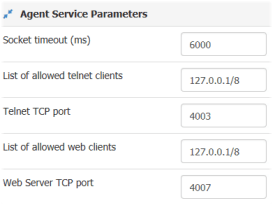
In the example, the agents in the configuration group will be accessible from:
- Telnet: The local computer (all addresses in the class A network 127.0.0.0) on TCP port 4003 (the default)
- Web: The local computer (all addresses in the class A network 127.0.0.0) on TCP port 4007 (the default)
When agents receive a configuration where the setup has changed for an interface, the agent restarts that interface server. Connected Telnet clients will need to reconnect.
Configure through registry
Section titled “Configure through registry”Using a registry editor (for example regedit), navigate to the PerformanceGuard registry key (usually HKLM\Software\PremiTech\E2EAgent), and add entries:
- WebServerPort and WebServerClientList for web server control
- TelnetPort and TelnetClientList for Telnet server control
The registry values and the configuration received from the PerformanceGuard server take precedence differently:
- Telnet: The registry values take precedence over the corresponding values in the configuration.
- Web server: The values in the configuration take precedence. The agent only uses the registry values if the configuration doesn’t contain the corresponding values.
When you change the agent Telnet or web server setup in the registry, you need to restart the agent. We recommend that you stop the agent while you edit the registry. See Agent Registry Keys.