

I Want to Know Who Consumes Resources
PerformanceGuard helps you quickly identify your “resource thieves:” processes and users who consume excessive amounts of resources like CPU power and RAM.
-
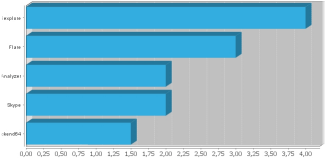
The quick overview: The Processes and Users graph (ANALYZE > Graphs > Combined Bar Charts > Processes & Users) provides the overview in an easy-to-view bar chart format, no matter whether you are looking for resource-consuming users or processes.
-
The details: The Hotspot Overviews hotspot (ANALYZE > Overview > Hotspots > Process Resources) provides detailed data about resource-consuming processes, and you can drill down to view which computers and user accounts ran a given process.